
TL;DR
BetPro net login registration does not need separate details for every supported access point. If you already have a BetPro ID and password, keep using them. A slow page, a blocked page, or a different access point does not mean you need another ID.
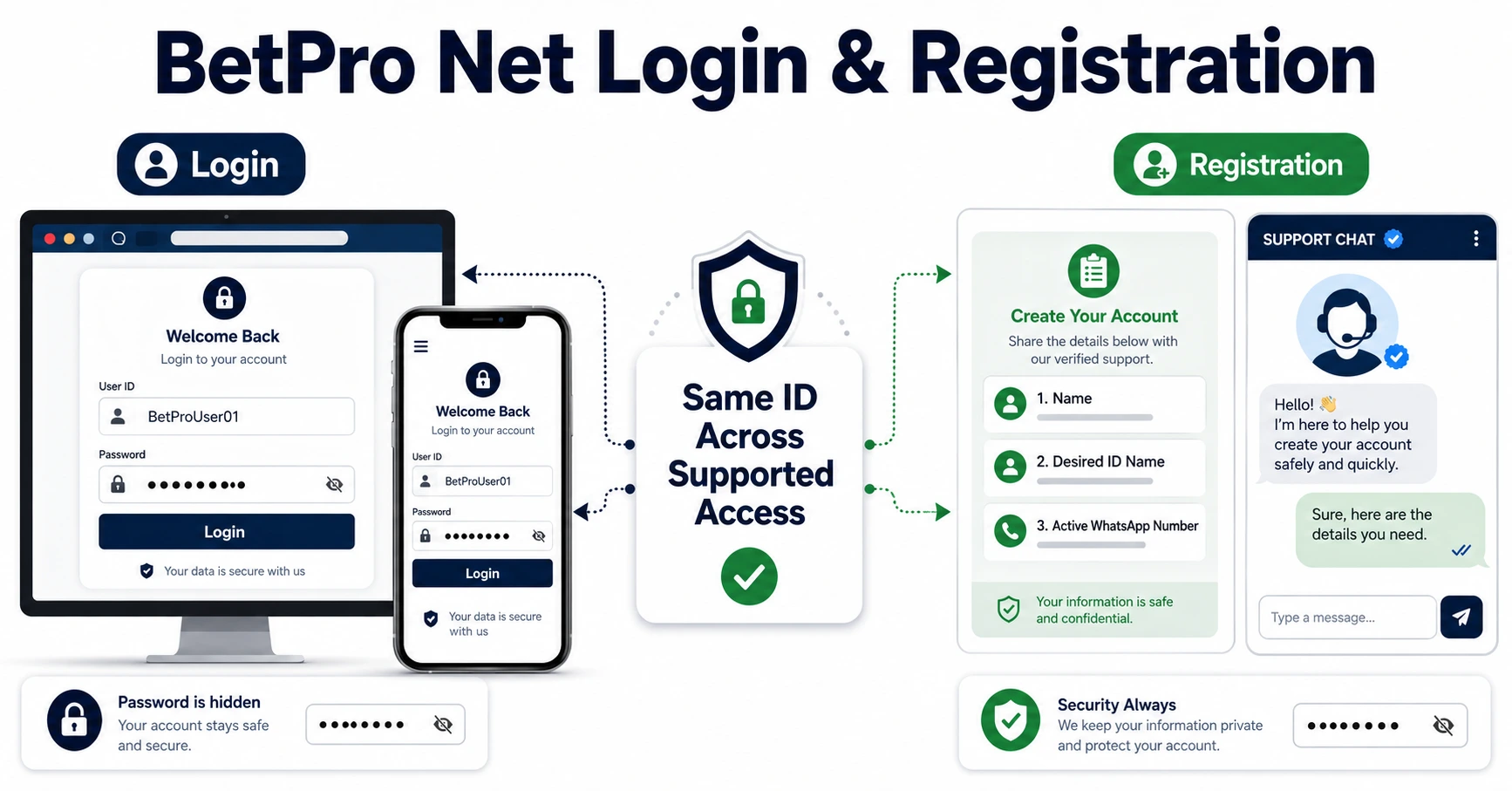
If you are new, request a BetPro ID through verified support. ID creation is free. You normally share your name, desired ID name, and active WhatsApp number. Setup often takes about five minutes after you send the correct details.
Do not search public comments for a new link. Do not install a random APK. This guide does not provide VPN or bypass steps.
If you forgot the password, contact your existing assigned dealer first. If the ID is inactive or locked, ask for a status check.
Use the BetPro ID login guide for login errors. Use the Create BetPro ID page when you have never received an ID.
Context
What Does BetPro Net Login Registration Mean?
People search for BetPro net login registration when they want one of two things. They either want to open an existing BetPro ID, or they want to request a new one.
The word “Net” often points to website access. A user may see a supported access page, a login form, or a registration option. The user may also be confused because one access point loads slowly while another works.
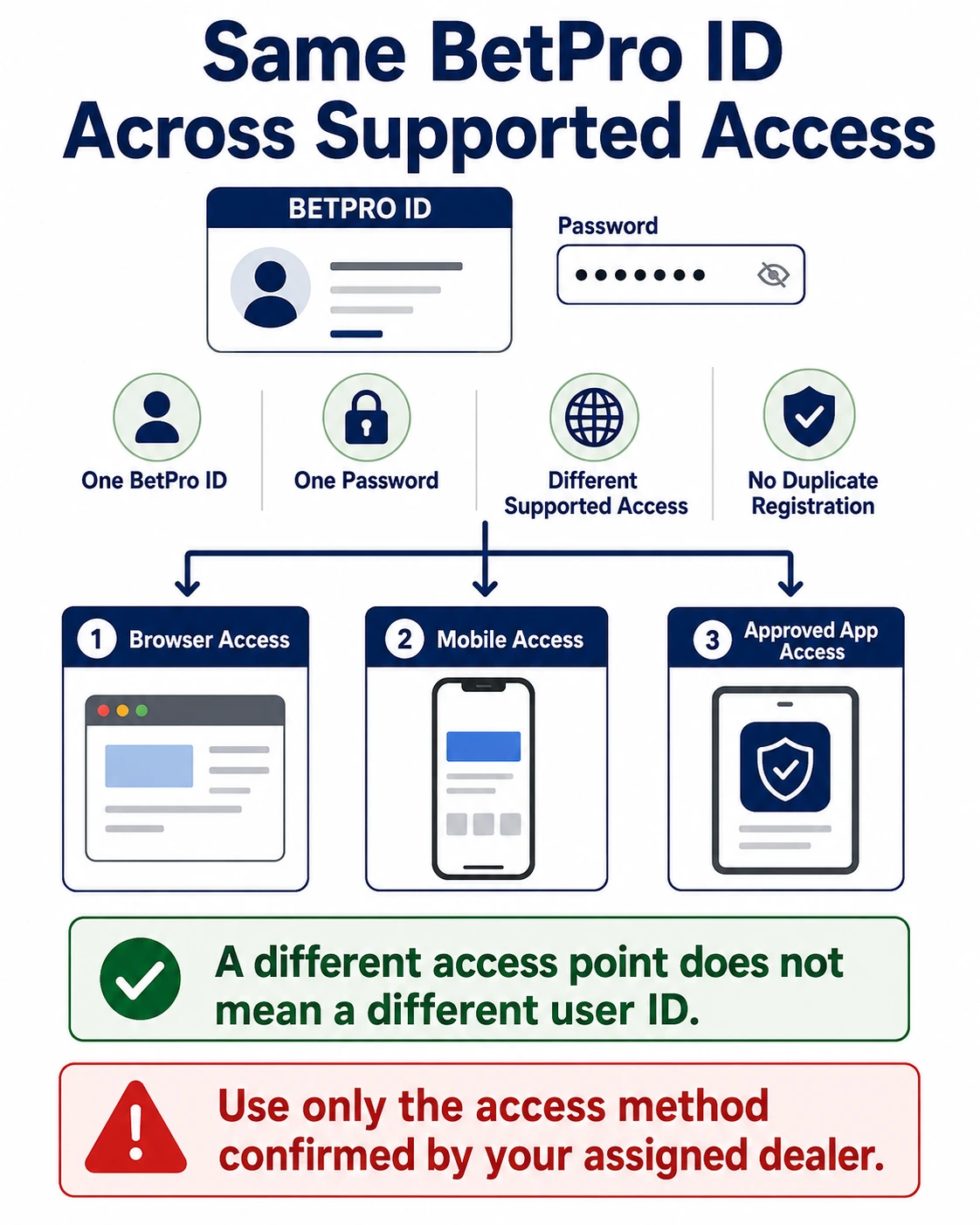
A BetPro ID is the main login identity. It stays linked to the user. The same assigned BetPro ID and password can work across supported access points.
You do not need a special password for each access point. You also do not need a fresh ID when one page changes or becomes slow.
Registration is different. It is only for a person who does not already have a BetPro ID.
This difference helps you choose the right path:
Existing user: use the same BetPro ID and password.
New user: request a new BetPro ID.
Forgotten password: contact the assigned dealer first.
Inactive or locked ID: request a status check.
Slow or unavailable access: keep the same credentials and use trusted support.
Many users make a simple mistake. They treat every access problem as a registration problem. That can create duplicate IDs, mixed passwords, and support delays.
This guide keeps the process clear. It explains login, registration, slow access, mobile use, password help, and safe support. It does not publish alternative domain names. It also does not link to outside login pages.
Do You Need Separate BetPro Net Credentials?
No. Existing users use the same assigned BetPro ID and password across supported access points.
Your credentials belong to you. They do not belong to one browser page.
Think of the BetPro ID as your name tag. Think of the password as your private key. The access point is only the door. A different door does not create a different person.
This is why you should not request another ID when an access point changes.
A duplicate ID can confuse:
- Passwords
- Deposit history
- Support checks
- Saved browser details
- Withdrawal records
- Dealer communication
Use one clear identity whenever possible.
When a page rejects the login, check the details first. The browser may have saved an old password. The ID may be inactive. The app may be outdated. The page may be loading slowly.
Do not assume that the credentials changed.
If your assigned dealer confirms a new access method, use the same BetPro ID and password unless the dealer clearly says otherwise.
What Works
How Existing Users Should Log In
BetPro net login registration starts with one question: do you already have a BetPro ID?
If yes, choose Login.
Prepare these items:
- Your assigned BetPro ID
- Your current password
- A trusted browser or approved app
- A stable internet connection
- A device you control
Open the trusted access method already shared with you.
Enter the BetPro ID in the ID field. Enter the password in the password field.
Check both fields once. Look for capital letters, numbers, and extra spaces. A saved password may be old.
Then select Login.
Do not keep pressing the login button when the page is frozen. Do not enter the same details on several random pages.
Read the error message. It can show whether the issue is the password, ID status, browser, app, or access point.
Use the BetPro ID login help page when you see inactive, locked, disabled, or repeated login errors.
Check the ID Before the Password
A correct password will fail when the ID is wrong.
Some IDs contain letters and numbers that look alike. The letter O may look like zero. The letter I may look like one.
Compare the ID with the original message from your assigned dealer.
Do not guess the ID name. Do not add spaces. Do not change the spelling.
Check Saved Login Details
Browsers can save old details. A shared phone may also hold another person’s login.
Tap the saved entry and check the user name. Remove the wrong entry.
Type the password by hand after a recent change.
When the login works, update the saved record only on a private device.
When a New User Needs Registration
A new user needs registration when no BetPro ID has been assigned yet.
Do not register again because:
- You changed phones
- A page loads slowly
- You forgot the password
- The app stopped working
- The ID is inactive
- The browser saved old details
Those problems need support or troubleshooting.
You should request a new ID when:
- You have never received one
- You have confirmed that no active ID belongs to you
- Your assigned dealer says a new setup is needed
Use the Create BetPro ID guide for the complete process.
What Details Are Needed for Registration?
A new BetPro ID request normally needs:
- Your name
- Your desired BetPro ID name
- Your active WhatsApp number
Use your real name. This helps support match the request with the right user.
Choose a clear ID name. Do not use private numbers, passwords, or banking details in the name.
Use your own WhatsApp number. Keep the number active. It may be used for setup and future support.
ID creation is 100% free.
The normal setup estimate is about five minutes after you provide the correct details.
This is an estimate. It may take longer when:
- A detail is missing
- The desired name is unclear
- The WhatsApp number is wrong
- Support traffic is high
- The dealer needs to check something
Send one complete message. Do not send the same request to many people.
A good message can say:
“Hello. I need a new BetPro ID. My name is [name]. My desired ID name is [ID name]. My WhatsApp number is [number].”
Never include:
- A banking PIN
- A wallet PIN
- A phone lock code
- An email password
- An OTP
- A current BetPro password
Registration does not require those secrets.
Does a New Access Point Require New Registration?
No. A new or different supported access point does not normally require a new BetPro ID.
Existing users should keep the same credentials.
A page may change because of heavy traffic, local availability, maintenance, or another technical reason. That change affects access. It does not automatically change the user identity.
Use this simple rule:
New access point: keep the current ID.
New user: request a new ID.
Forgotten password: contact the dealer.
Inactive ID: ask for a status check.
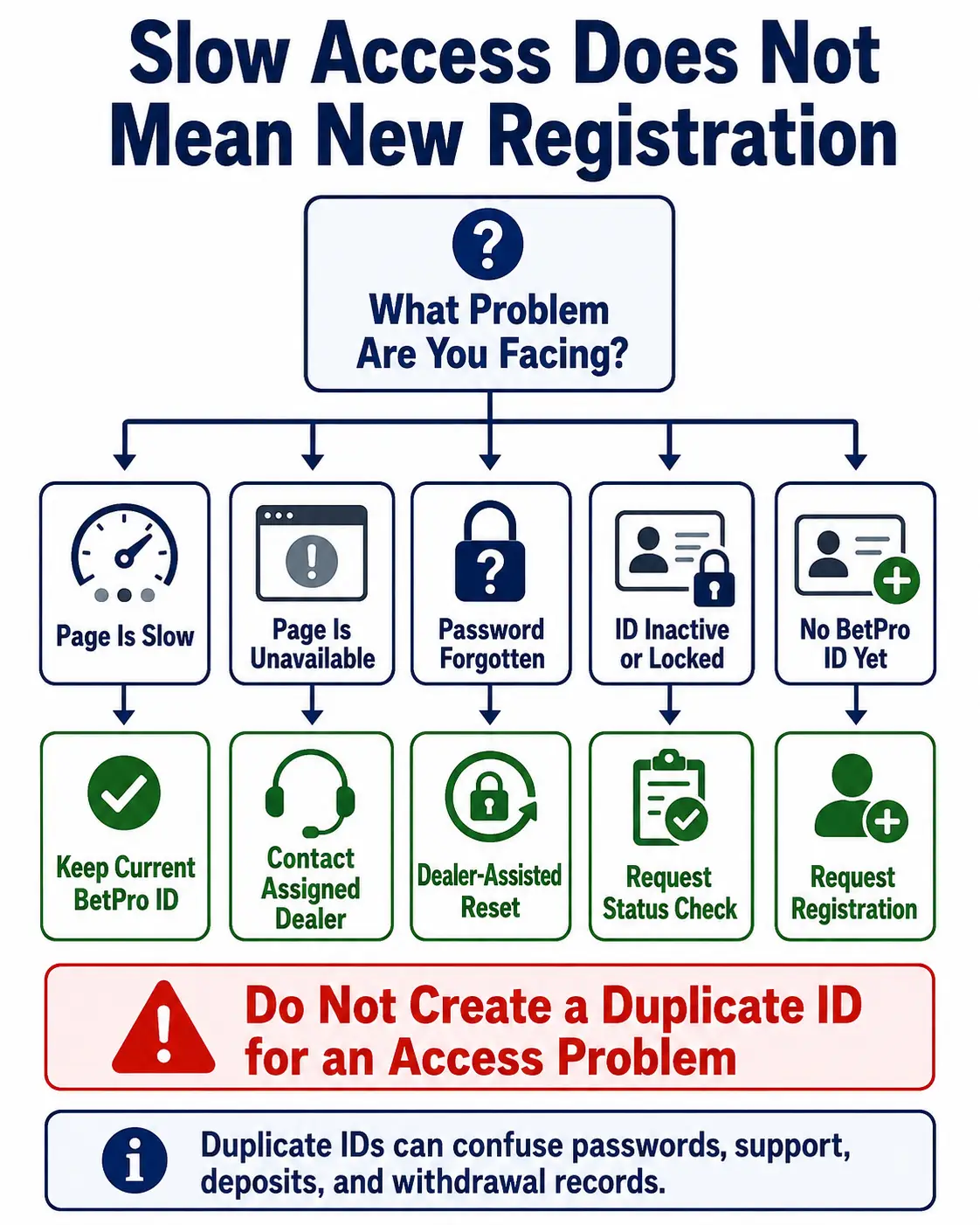
This rule prevents duplicate registration.
Before you request a new ID, ask:
Do I have no BetPro ID, or do I only have an access problem?
When the ID already exists, solve the access problem first.
Read the BetPro login versus sign-up guide when you are unsure which action fits your situation.
What to Do When a Login Page Is Slow
A slow page can feel like a login failure. It is not always the same problem.
Start with your internet connection. Open another normal website. If every page is slow, the issue may be the network.
Wait for a short time. Then refresh once.
Do not refresh every second. Do not submit the login form many times.
Close extra browser tabs. Heavy pages can slow an older phone.
Try a trusted browser already installed on your device.
Check the date and time on the phone. A wrong clock can affect secure pages.
Turn off screen-sharing tools and unknown browser extensions.
When the page opens, check the address bar carefully. Do not enter credentials when the page looks different or came from an unknown message.
If the trusted access point remains slow, contact the assigned dealer. Keep your existing BetPro ID and password.
What to Do When Access Is Unavailable
Do not panic when an access page does not open.
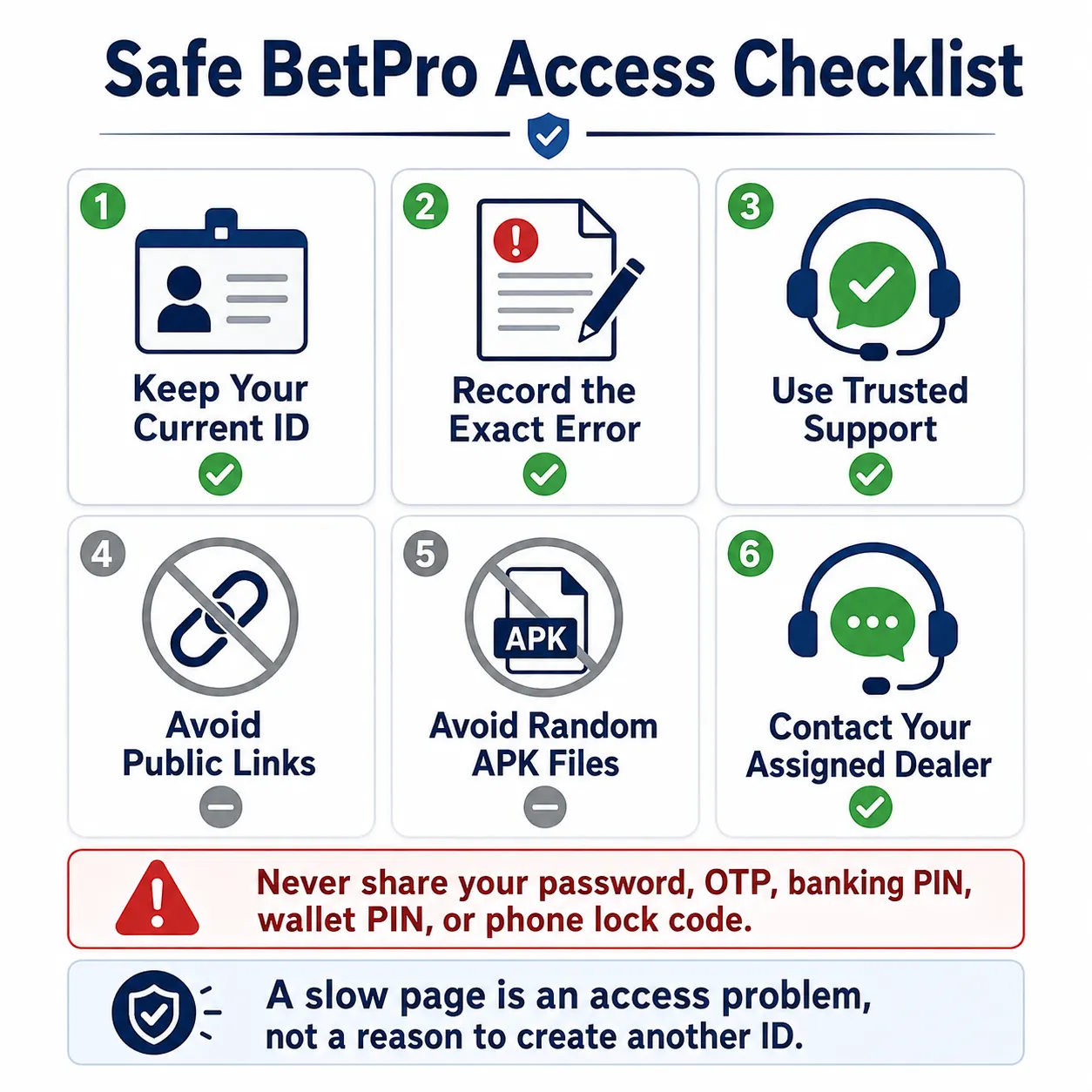
First, record the error. Take a safe screenshot that hides private details.
Note whether the page shows:
- Server error
- Blank screen
- Loading message
- Connection error
- Security warning
- Page not found
Do not post the screenshot in a public group when it includes your ID.
Use the trusted conversation with your assigned dealer. Explain what happened and when it started.
Do not search public comments for a “new BetPro link.” A fake page can copy a familiar name and logo.
Do not trust a forwarded support number only because it looks official.
Keep the same credentials. Wait for the dealer to confirm the supported access method.
When the problem appears only in an app, try the trusted browser. When the browser works, the issue may be the app or saved app data.
Why We Do Not Publish New BetPro Links
This article does not list alternative login domains.
There are three reasons.
First, access points can change. A list can become old quickly.
Second, fake pages can copy familiar names. Publishing many names may confuse users.
Third, this website does not give backlinks to those access points.
The safer approach is simple. Use the access method already supplied by your assigned dealer. When it stops working, ask for the current supported method through the same trusted conversation.
Do not use a link from:
- Public comments
- Unknown groups
- Forwarded messages
- Random download pages
- Unverified social profiles
A trusted support path matters more than a long link list.
Do You Need a VPN for BetPro Login?
This guide does not provide VPN or bypass instructions.
Local access can vary. A page may be slow or unavailable for several reasons.
Do not install an unknown VPN because a public comment promises access. A bad app may collect browsing data, messages, passwords, or device information.
Do not change device settings that you do not understand.
Use the trusted access method provided by the assigned dealer. Ask for support when the page remains unavailable.
This keeps the article focused on safe login and registration.
Can You Register Through an App or APK?
You do not need a random app to request a new BetPro ID.
A new user can share the required setup details through verified support.
Existing users may use approved mobile access. The same assigned ID and password still apply.
Android users should obtain the approved app or APK source only through verified support.
Do not install the first file shown in search results.
A fake APK may:
- Copy a login screen
- Collect the ID and password
- Read device data
- Show false updates
- Send users to unsafe pages
iPhone users should use supported browser access when an Android APK does not apply.
Read the BetPro app and Android guide for safe installation and login help.
What If the Password Does Not Work?
A password problem does not require new registration.
Check the ID first. Then check the password.
Look for:
- Capital letters
- Extra spaces
- Old saved password
- Wrong ID
- Recent password change
Stop after a few careful tries.
When you know the current password and can log in, you can change it through Profile.
When you forgot it, contact your existing assigned dealer first. Users do not have a confirmed self-service reset option.
Read the BetPro ID password guide for the full process.
Do not download a free password, password file, or password APK.
What If the ID Is Inactive or Locked?
An inactive or locked ID is a status problem.
It may reject the correct password.
Do not request another ID. Do not keep guessing.
Record the exact error. Contact the assigned dealer. Ask for an ID status check.
Share the BetPro ID, registered name, and registered WhatsApp number when needed.
Never share the current password or OTP.
Use the BetPro ID security guide when a message, number, link, or file feels unsafe.
Common Registration Mistakes
Small mistakes can delay registration.
Missing Name
Support needs a clear name. Send it in the first message.
Unclear ID Name
Choose a readable desired ID name. Avoid very long strings.
Wrong WhatsApp Number
Use your own active number. Check every digit.
Duplicate Request
Do not send the same request to many dealers. This can create confusion.
Paying an ID Creation Fee
BetPro ID creation is free. Rs. 500 is the minimum deposit, not a registration fee.
Sharing Private Secrets
Do not send a password, OTP, PIN, or device unlock code.
Installing an Unknown APK
Registration does not need a random APK.
Using a Public Link
Stay in the verified support route.
Is Registration the Same as Deposit?
No. Registration creates the BetPro ID. Deposit is a later step.
ID creation is free.
The verified minimum deposit is Rs. 500.
The verified minimum withdrawal is also Rs. 500.
A 15% first-time deposit offer applies to the first qualifying deposit.
Before withdrawal, at least 50% of the first deposited amount must be rolled through events. This affects withdrawal eligibility.
Read the BetPro deposit and withdrawal guide before sending money.
Confirm the recipient and method through verified support.
Do not send money only because a stranger promises fast registration.
How to Keep One Clear User Record
One user should keep one clear set of details.
Store the BetPro ID in a private note or password manager. Store the password securely.
Keep the assigned dealer conversation.
Use the same registered name and WhatsApp number when asking for help.
Do not mix one user’s details with another person’s phone.
When you change your WhatsApp number, tell the assigned dealer through a trusted conversation.
Delete old saved passwords after a confirmed change.
This simple record helps with login, password resets, deposits, withdrawals, and status checks.
What to Do After Registration
After you receive the ID and password, check both details.
Log in through the trusted access method.
Do not share the credentials in a group.
Open Profile and learn where the password option appears.
You can change a known password there.
Keep payment instructions separate. Confirm the current recipient before a deposit.
Read how BetPro ID works for the full user journey.
Keep the support route saved. It can help when access, password, app, or payment problems appear.
How to Check a Trusted Access Method
A trusted access method should come from the conversation you already know. Do not judge a page only by its colors, logo, or name.
Before you enter the BetPro ID, check a few things.
Make sure the link came from your assigned dealer or verified support. Avoid links copied from public comments. Check whether the page uses a secure connection. Look for spelling mistakes, unusual popups, and requests for details that a normal login should not need.
A normal login form asks for the BetPro ID and password. Be careful when a page asks for:
- Banking PIN
- Wallet PIN
- Email password
- Phone unlock code
- Remote screen control
- Payment before login
Close the page when something feels wrong. Take a safe screenshot that hides private details. Send it to the assigned dealer for checking.
Do not test a doubtful page with a “small” password. Any password can expose the ID. Do not use another person’s credentials for testing.
Save the trusted support conversation. This gives you a clear place to ask about future access changes.
What Information Should You Save for Support?
Good records can make support faster.
Save the exact BetPro ID. Save the registered name and WhatsApp number. Keep the original dealer conversation.
When a problem happens, note:
- The exact error message
- The time it started
- The device used
- Whether browser or app was used
- Whether the password changed recently
- Whether another trusted access point worked
Do not save private details in a public note. Use a secure password manager or protected device.
A safe screenshot can help, but hide balances, passwords, OTPs, phone numbers, and transaction details that are not needed.
Clear records help the dealer separate an access problem from a password or status problem. They also reduce repeated questions and prevent a duplicate registration request.
Keep one clear support thread whenever possible. It helps you track answers, avoid fake contacts, and confirm which instructions came safely from your assigned dealer first.
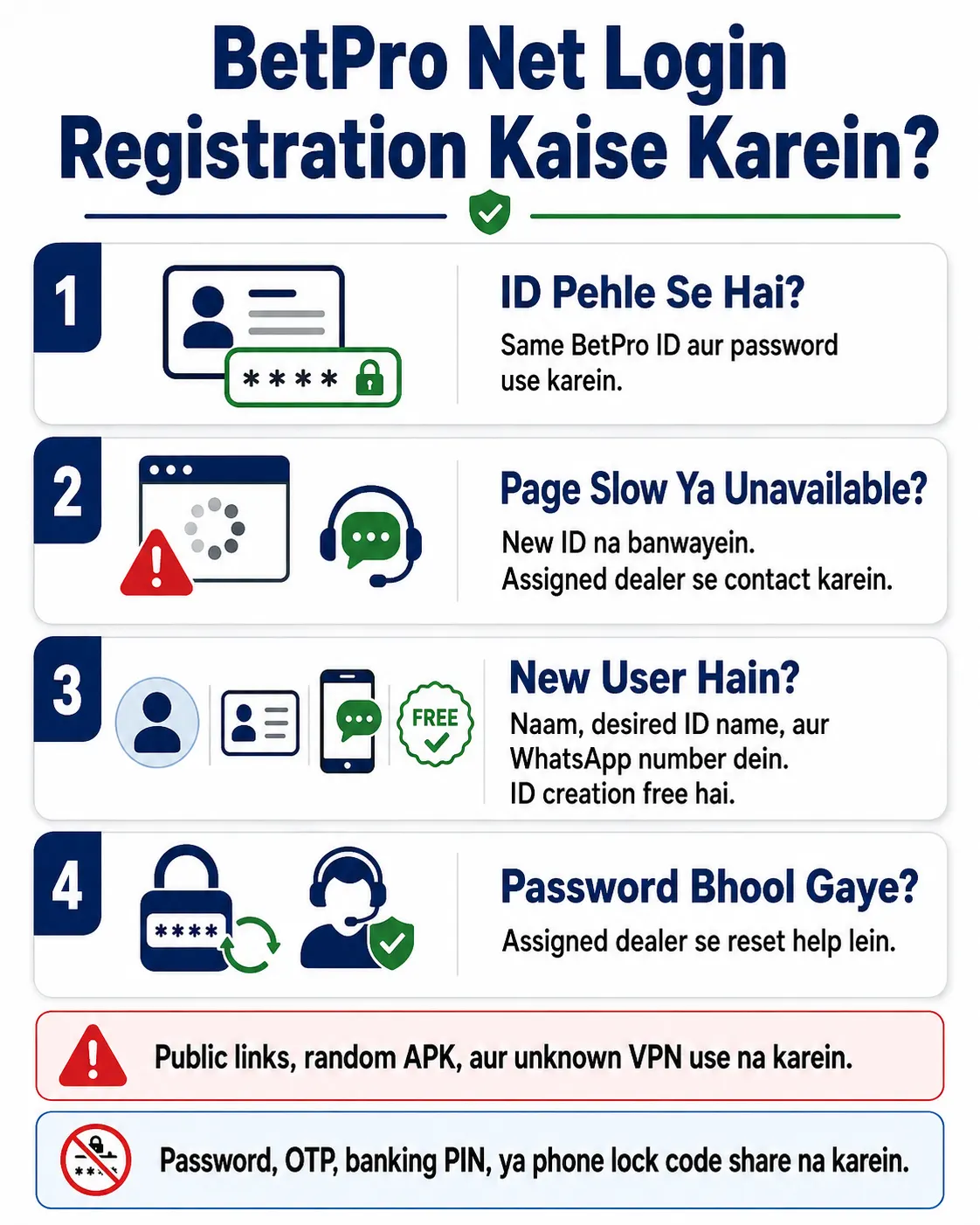
BetPro Net Login Registration Kaise Karein?
Agar aap ke paas pehle se BetPro ID aur password hai, to same details use karein. Har new access page ke liye new ID ki zarurat nahi hoti.
Agar page slow hai ya open nahi ho raha, to duplicate ID request na karein. Apne assigned dealer se trusted access method poochhein.
Agar aap new user hain aur BetPro ID nahi hai, to verified support se registration request karein. Apna naam, desired ID name, aur active WhatsApp number dein. ID creation free hai. Setup aam tor par correct details milne ke baad takreeban paanch minute leta hai.
Password bhool gaye hon to assigned dealer se contact karein. Inactive ya locked ID par status check karwayein.
Public comments se new link na lein. Random APK ya unknown VPN install na karein. Password, OTP, banking PIN, wallet PIN, ya phone lock code share na karein.
Trade-offs
Why This Guide Does Not Name Alternative Domains
This guide does not publish specific alternative domains.
Access points may change. Some may become slow. Some may stop working in a local area.
A fixed list can become wrong. It can also send users toward copied or unsafe pages.
The website also follows a no-backlink policy for those access points.
The article focuses on the user process instead:
- Keep the same ID
- Keep the same password
- Use trusted support
- Avoid public links
- Ask the dealer when access changes
This advice stays useful even when a domain changes.
Why Access Trouble Is Not Registration Trouble
Access trouble means the page, app, browser, or local connection is causing a problem.
Registration trouble means a new user has not received an ID.
These are different.
A slow page needs patience and safe troubleshooting.
A forgotten password needs dealer help.
An inactive ID needs a status check.
A bad APK needs removal and security checks.
Only a person with no BetPro ID needs registration.
Mixing these problems can create duplicate IDs and longer support conversations.
What This Guide Does Not Cover
This guide does not provide:
- Alternative domain lists
- Direct login links
- VPN setup
- Bypass instructions
- Legal advice
- Live outage reports
- Admin credentials
- Direct APK files
- Physical dealer locations
- Full withdrawal instructions
It also does not promise that every access point will work all the time.
The guide explains the safe process. It links to specialist pages for login, password, app, payment, security, and registration help.
Next Steps
Choose the Correct Action
Use this final path.
You already have a BetPro ID and password:
Use Login. Keep the same credentials.
You have never received a BetPro ID:
Request registration through verified support.
The page is slow:
Wait, refresh once, and keep the current ID.
The page does not open:
Record the error and contact the assigned dealer.
You forgot the password:
Contact the assigned dealer first.
The ID is inactive or locked:
Ask for a status check.
The app does not work:
Try trusted browser access and open the App guide.
You see a public “new link”:
Do not enter credentials until support verifies it.
Someone asks for a password or OTP:
Stop and verify the contact.
Do I Need a New BetPro ID for Another Access Point?
No. Existing users use the same assigned BetPro ID and password across supported access points. A different access point does not normally require another registration.
Is BetPro Net Registration Free?
Yes. Creating a BetPro ID is free. Rs. 500 is the minimum deposit, not a registration fee.
What Should I Do When the Login Page Does Not Open?
Keep your current credentials. Record the error and contact your assigned dealer through the trusted conversation. Do not use public links, random APKs, or unknown bypass tools.
Conclusion
New user? Create your free BetPro ID. Existing user with an access problem? Open BetPro ID Login Help and keep your current credentials private.
EDITORIAL REVIEW
Reviewed for clarity, safety and independent status
This article is managed by the BetPro-ID.PK Support and Editorial Desk. Content is checked before publication and updated when important facts change.