
TL;DR
A BetPro ID dealer is the support contact involved in ID setup or certain ID-related checks. Existing users should work with the dealer they already know when possible. If that person is unavailable or an unfamiliar contact appears, return to the support route published on BetPro-ID.PK before sharing information.
Use a dealer for the problems that actually need dealer help. A forgotten password is the clearest example. If you cannot remember your BetPro ID password, stop guessing and contact your BetPro ID dealer first. Do not create a second ID, download a reset tool, or trust an unknown reset link.
Share only the minimum information needed to identify the issue. Your BetPro ID, registered name, exact error message, device, browser, app, and a redacted screenshot may be useful. Keep passwords, OTPs, reset codes, wallet PINs, bank PINs, banking passwords, email passwords, card security codes, and remote-access codes private.
A dealer cannot guarantee activation, recovery, payment completion, profit, winnings, or a fixed response time. This guide explains how to verify support, protect private details, route password and status problems correctly, and avoid fake dealer contacts.
Context
What Is a BetPro ID Dealer?
A BetPro ID dealer is a support contact connected with the dealer-based setup or support process used by BetPro-ID.PK. The dealer may help a new user request an ID, help an existing user with a forgotten password, or assist with an ID-status question that cannot be solved through normal self-checks.
The dealer is not the same as your password. Your BetPro ID identifies your login. Your private password protects access. A support contact may need enough information to locate the correct ID, but that does not mean the person needs your current password or security codes.
BetPro-ID.PK describes itself as an independent dealer-based support website for adults in Pakistan. It is not the corporate BetPro website. That distinction matters because users should not treat every person using a BetPro name, logo, profile photo, or support label as automatically verified.
Think of the assigned dealer as one possible human support route inside a wider help system. The site already has owner pages for new ID creation, login help, password recovery, app safety, payments, account security, and general support. Use the page that owns your problem first. Then involve a dealer when the issue needs a person.
What Can a Dealer Help With?
A dealer may help with a limited set of practical support tasks. The clearest examples are new-ID routing, forgotten-password assistance, and some account-status checks.
For a new user, the dealer-assisted route can help collect the basic setup details and move the ID request forward. The confirmed basic details are the user’s name, desired BetPro ID name, and active WhatsApp number. New ID creation is free, and no deposit is required before receiving and testing a new ID.
For an existing user who forgot the password, the BetPro ID dealer is the first support route. The dealer can help identify the correct ID and guide the user through the approved reset process. The dealer should not need the user’s current private password.
For an inactive, blocked, locked, or old ID, a dealer or verified support route may help check status after the user confirms the correct login details and records the exact message shown.
A dealer cannot promise that an ID will be created, reactivated, recovered, or approved. A dealer also cannot guarantee a withdrawal, deposit result, profit, winnings, or a fixed response time.
Assigned Dealer vs Random Contact
An assigned dealer is a person or support contact you already know from an earlier ID setup or support conversation. A random contact is someone you found through a search result, forwarded message, public comment, copied profile, group post, advertisement, or unknown number.
That difference is important. A familiar name or profile photo is weak evidence. Names can be copied. Logos can be reused. Screenshots can be edited. A forwarded number does not prove that the person is connected to the support route you used before.
When you already have a working conversation with the assigned dealer, start there. Check the old chat history, the original ID message, and previous successful support exchanges. If the contact has changed or the conversation feels different, stop and verify the route again.
When you do not know the contact, open the support page on BetPro-ID.PK and use the support route published there. Do not move to another number simply because someone says the old contact is closed, blocked, upgraded, or replaced.
Dealer Help vs General Support
Not every problem needs a dealer. Use the owner guide first so you can solve simple issues without exposing unnecessary information.
Use the Create ID guide when you have never received a BetPro ID. Use Login Help when the page does not open, the ID is rejected, or correct details fail. Use the Password guide when you cannot remember the password. Use the App guide for APK, Android, version, and installation problems. Use Security Help after suspicious links, unexpected OTPs, exposed details, or remote-access requests.
General support is useful when the assigned dealer is unavailable, the issue remains unresolved, the instructions conflict, or an account-status check still needs a person. The support page tells users to read the detailed owner guide first, then contact verified support only when a dealer or account check is still required.
This structure keeps one problem with one owner. It also reduces duplicate IDs, repeated messages, conflicting instructions, and unnecessary sharing of private data.
What Works
Check 1: Confirm the Dealer You Already Know
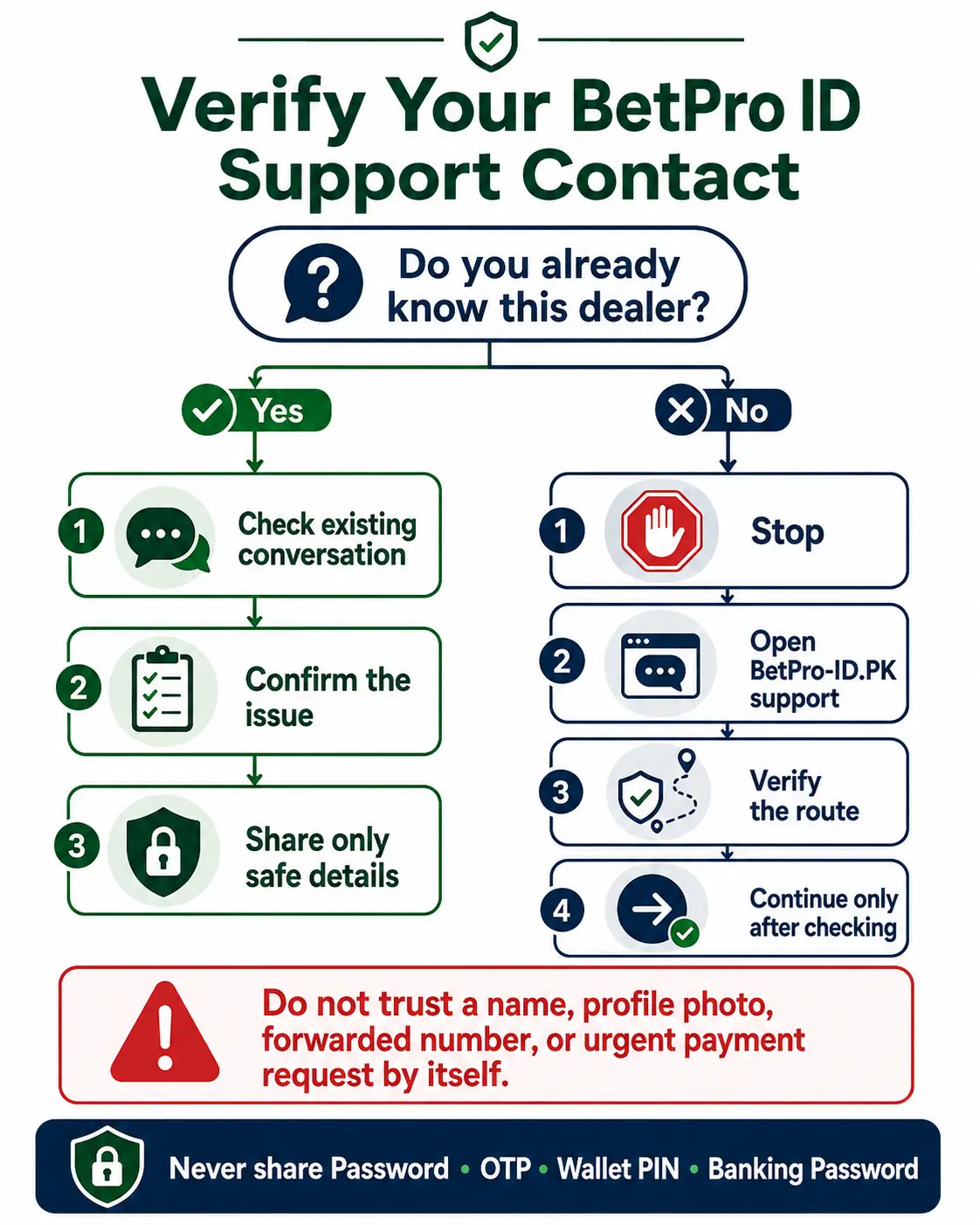
Start with continuity. Search your existing WhatsApp conversations, old support messages, saved notes, and the message that contained your original BetPro ID. A previous successful conversation gives you more context than a new profile found in search.
Check whether the same contact helped with ID setup, a password issue, or another verified task. Read enough of the old conversation to confirm that you are not opening a copied thread or a new contact with a similar display name.
Do not rely on the profile picture alone. A support logo, green check image, “official” label, or familiar name can be copied. The conversation history and the route you originally used matter more.
If someone contacts you first from a new number, do not move immediately. Return to the support route published on BetPro-ID.PK and verify the next step. Ask a simple question without sending private codes or payment details.
Keep one support conversation when possible. Starting several chats at the same time can create conflicting instructions and make it harder to know which person has the correct issue record.
Check 2: Share Only Safe Information
A good support message is short, factual, and limited to the issue. The goal is to give enough information to identify the correct BetPro ID without giving away secrets.
Useful details may include your BetPro ID, registered name, registered WhatsApp number when relevant, exact error message, date the problem started, phone model, Android version, browser, app, or whether the same details work through another supported route.
A redacted screenshot can help when an error message is difficult to describe. Before sending it, hide passwords, OTPs, PINs, balances, payment account numbers, unrelated transactions, personal notifications, email addresses, and any information that does not help solve the problem.
For an inactive ID, tell support the BetPro ID, exact inactive message, last known successful access, and whether an open transaction still needs review. For a login problem, include the exact message and the device or browser. Do not send the password to prove that you know it.
The rule is minimum necessary information. If a detail does not help identify the ID or explain the error, leave it out.
Check 3: Keep Passwords and Codes Private
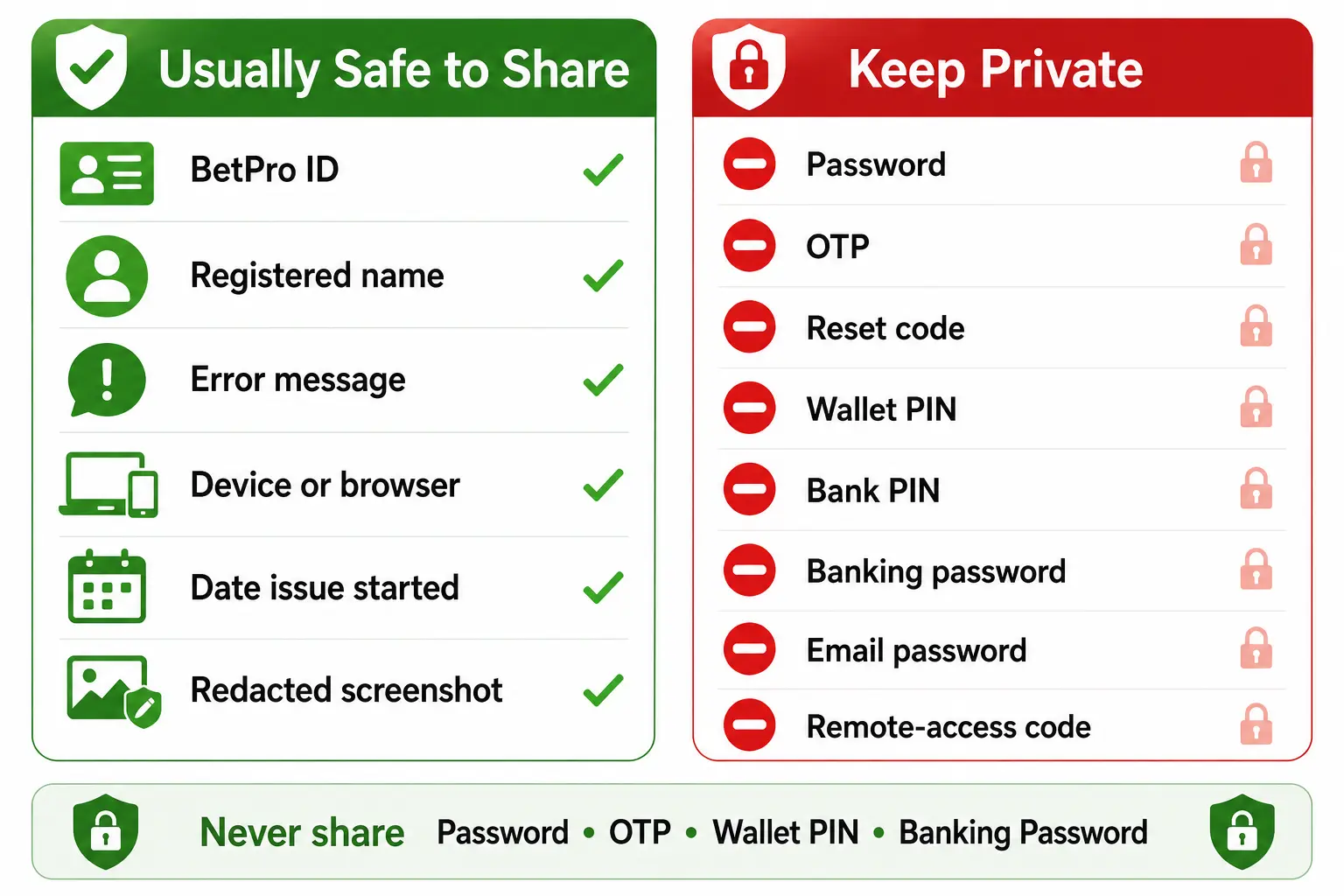
Your password is not support evidence. Keep the current password private. Do not send an old password either. Do not post passwords in screenshots, group chats, comments, emails, forms, or support messages.
Keep OTPs and reset codes private. A person who asks for an OTP may be trying to complete an action from another device. The same rule applies to email verification codes, phone unlock codes, and remote-access codes.
Keep payment secrets separate from BetPro ID support. Never send a wallet PIN, bank PIN, banking password, card PIN, card security code, or mobile-wallet password to a dealer.
Do not install remote-control software for a basic ID, login, or password problem. Do not share a screen-control code. An unknown person with remote access can see messages, open payment apps, read OTPs, or change settings.
If you already exposed a password or code, stop the conversation. Secure the affected service through a trusted route, change exposed credentials where possible, save safe evidence, and use the security guide for the next steps.
Check 4: Use the Dealer for Forgotten-Password Help
A forgotten password is the clearest dealer-first case. If you cannot remember your BetPro ID password, stop repeated guessing. One or two careful checks are enough.
First, confirm the BetPro ID. Check letters, numbers, spaces, and any saved username. A correct password paired with the wrong ID will still fail.
Next, check whether your browser or password manager saved the current password. Make sure the saved entry belongs to your ID and not another user.
If the password is still unknown, contact your BetPro ID dealer first. Use a short message such as: “Hello. I know my BetPro ID, but I forgot the password. Please guide me through the approved recovery process.”
Share the BetPro ID and safe identifying details only when needed. Do not send your current or old password, OTP, reset code, banking PIN, or remote-access code.
Do not create a second ID because the password is forgotten. Do not download a password file, reset tool, modified APK, or so-called free login package. Do not trust a public reset-code generator.
If you still know the current password and can log in, the situation is different. The password guide says a known password can be changed from Profile. Dealer-first help is for the forgotten-password case.
Check 5: Ask for an ID-Status Check Correctly
An ID-status problem is different from a password problem. The screen may say inactive, blocked, locked, disabled, or show another access message even after you confirm the correct ID and password.
Before contacting a dealer, check the basics. Confirm the ID spelling. Confirm the password. Remove extra spaces. Check browser autofill. Test a stable connection. Use a trusted access route. If an app is failing, test a supported browser route.
Then record the exact message. Do not paraphrase it when a screenshot can show the wording safely. Redact all private details before sending the image.
Tell the dealer or verified support the BetPro ID, exact status message, when the issue started, and the last time access worked. Ask for an account-status check.
Do not make a payment before the status is confirmed. Do not pay an unknown person for instant activation, unlock, priority recovery, or a “special dealer panel.” Support can review an issue, but it cannot guarantee activation or recovery.
If the status problem continues, use BetPro ID Login Help or the general support route rather than creating another ID.
Check 6: Understand the Dealer’s Role in New ID Setup
A dealer may be involved in the new-ID process, but this article does not replace the Create ID guide.
The confirmed basic setup uses your name, desired BetPro ID name, and active WhatsApp number. ID creation is free. Normal setup is described as taking about five minutes after the complete details are provided, but timing can vary and should not be treated as a guarantee.
No deposit is required before you receive and test the new ID. That separation is important. ID creation and payment are different steps.
Use the Create ID page when you have never received an ID. Follow its current requirements and support route. Do not send additional personal documents simply because an unknown dealer asks for them.
Once you receive the ID and password, record them privately. Confirm that the ID works through the supported route. Do not publish the credentials or forward them to another person.
Existing users should not restart the creation process for a login, password, app, or status issue. Use the owner guide for the actual problem.
Check 7: Separate Login and App Problems
A dealer is not the first answer for every failed app screen. Many app and login problems can be narrowed down before support becomes necessary.
When the app does not open, crashes, shows a blank screen, or rejects details that worked before, test a supported browser route with the same BetPro ID and password. The same credentials normally work across supported access points.
If the browser works, the issue likely sits with the app, APK version, Android compatibility, storage, permissions, cache, or device settings. Use the BetPro app guide instead of requesting a new ID.
If both app and browser reject the same verified credentials, use Login Help. Check the ID, password, status message, and access route before asking a dealer for a status check.
Do not install random APK files from advertisements, forwarded messages, or unknown download pages because someone says they will fix the login. Verify the app source through the published support route.
Check 8: Keep Payments Separate
A dealer-support conversation should not blur password help, account status, and payments into one urgent request.
If the issue is a deposit or withdrawal, use the payments owner page. Confirm current recipient details, amount, limits, evidence requirements, and instructions before sending money. Payment conditions can change, so use current guidance.
Never send money to unlock a forgotten password. Never pay an unknown person for instant ID activation or priority status review. A password or status problem should be checked before any payment is made.
Never share a wallet PIN, bank PIN, banking password, card PIN, email password, OTP, or full bank statement with a dealer. When payment proof is genuinely needed, redact unrelated transactions and private details.
Keep a clear record of the amount, date, transaction reference, and current status for a payment problem. Then use verified support when the payment guide says a person is needed.
Check 9: Know What to Do When the Dealer Is Unavailable
Losing contact with an assigned dealer does not mean you should trust the first replacement number you find online.
Start by keeping the old conversation. Do not delete the chat, original ID message, or safe evidence. The history may help explain how the ID was created and what support steps already happened.
Next, open the support page on BetPro-ID.PK. Use the support route published there. Explain that you already have a BetPro ID but cannot reach the assigned dealer.
Provide the BetPro ID, issue category, short description, and exact error when relevant. Say clearly what you need: password help, status check, login guidance, or another owner route.
Share redacted evidence only when it helps. Hide passwords, OTPs, PINs, balances, unrelated transactions, and private account details.
Ask for the correct next step rather than demanding a new dealer, new ID, or guaranteed reset. Keep one verified support conversation while the case is reviewed.
If the issue involves suspicious behaviour from the old contact, stop communicating with that person and use Security Help. Save safe screenshots and dates, but do not send secret codes as evidence.
Fake Dealer and Support Warning Signs
Fake or unsafe support often creates urgency. Be cautious when a new contact says the ID will be closed immediately unless you pay, share a code, install an app, or move to another number.
Stop when someone asks for the current password, OTP, reset code, bank PIN, wallet PIN, banking password, email password, card security code, or remote-access code.
Be cautious with guaranteed language. Claims such as “100% recovery,” “instant activation,” “guaranteed withdrawal,” “fixed response in five minutes,” or “special dealer access” go beyond the confirmed support rules.
Avoid modified APKs, cracked apps, remote-control tools, alternative domain lists, and hidden login links offered as dealer-only solutions.
Do not trust a profile name, photo, logo, badge, or screenshot by itself. Return to the support route published on BetPro-ID.PK when the contact is unfamiliar.
Do not let embarrassment or urgency push you into sharing more. A legitimate support process can work with limited identifying information and a clear issue description.
Trade-offs
Dealer Help vs Self-Service
Dealer support is useful when the process genuinely needs a person. Forgotten-password recovery is the strongest example because there is no confirmed public self-service reset for a forgotten BetPro ID password.
Other tasks are better handled through self-service checks first. If you know the current password, change it from Profile. If the app fails, test browser access. If the page does not open, use Login Help. If you need a new ID, use the Create ID guide.
This approach saves time and protects privacy. It also prevents users from sending credentials to a dealer when the problem can be solved without human access.
Assigned Dealer vs General Support
An assigned dealer has continuity. The person may already know the original ID setup or previous support history. That can make a forgotten-password or status conversation easier.
General support becomes important when the assigned dealer is unavailable, the instructions conflict, or the issue remains unresolved. The verified support route can help direct the user to the correct owner page or account check.
Neither route should require your current password, OTP, wallet PIN, banking password, or remote-access code. The difference is continuity and routing, not permission to access private secrets.
Verification vs Privacy
Support needs enough information to find the right case. Privacy requires you to share no more than necessary.
The balance is simple: identify the BetPro ID, explain the issue, include the exact error, and provide limited redacted evidence when useful. Hide everything unrelated.
Do not send full bank statements, unrelated transaction histories, private chats, contact lists, identity documents, or device-control access unless a clear verified process explains why a specific item is necessary.
When a request feels excessive, stop and confirm the support route before continuing.
Next Steps
Choose the Correct Support Route
Use one owner page for one problem.
- New ID: use Create ID.
- Existing login problem: use BetPro ID Login Help.
- Forgotten password: use the BetPro ID password guide and contact the assigned dealer first.
- App or APK problem: use the BetPro app guide.
- Suspicious contact or exposed details: use BetPro ID Security.
- Dealer unavailable or issue unresolved: use verified BetPro ID support.
Do not open several support conversations for the same issue. Keep the problem clear, use the correct owner guide, and involve a person only when the next step requires it.
FAQs
How Do I Find My BetPro ID Dealer?
Start with the support conversation or contact involved when your BetPro ID was created. Check the original messages and previous successful help. If that contact is unavailable or you are unsure about a new number, use the support route published on BetPro-ID.PK and explain that you cannot reach your assigned dealer.
Can a BetPro ID Dealer Ask for My Password?
No safe support process should require your current password. A dealer or support contact may need your BetPro ID, registered name, exact error, device details, or limited redacted evidence. Keep passwords, OTPs, PINs, banking passwords, email passwords, and remote-access codes private.
What If My BetPro ID Dealer Does Not Reply?
Do not search random public numbers or trust forwarded contacts. Open verified BetPro ID support, explain that your assigned dealer is unavailable, provide a short description of the issue, and ask for the correct next route. Keep the old conversation as safe evidence.
Conclusion
Use your existing assigned dealer when you already know and trust that contact. If the dealer is unavailable, the number changes unexpectedly, or the conversation feels unsafe, return to the verified support route published on BetPro-ID.PK.
Share only the information needed to identify the BetPro ID and explain the problem. Never send a password, OTP, reset code, banking password, wallet PIN, email password, card PIN, or remote-access code. Use the dedicated Create ID, Login, Password, App, Security, or Support guide when that page already owns your problem. Adults aged 18 or older only. Betting can cause financial loss, so set limits, never chase losses, and never use borrowed money.
EDITORIAL REVIEW
Reviewed for clarity, safety and independent status
This article is managed by the BetPro-ID.PK Support and Editorial Desk. Content is checked before publication and updated when important facts change.