
TL;DR
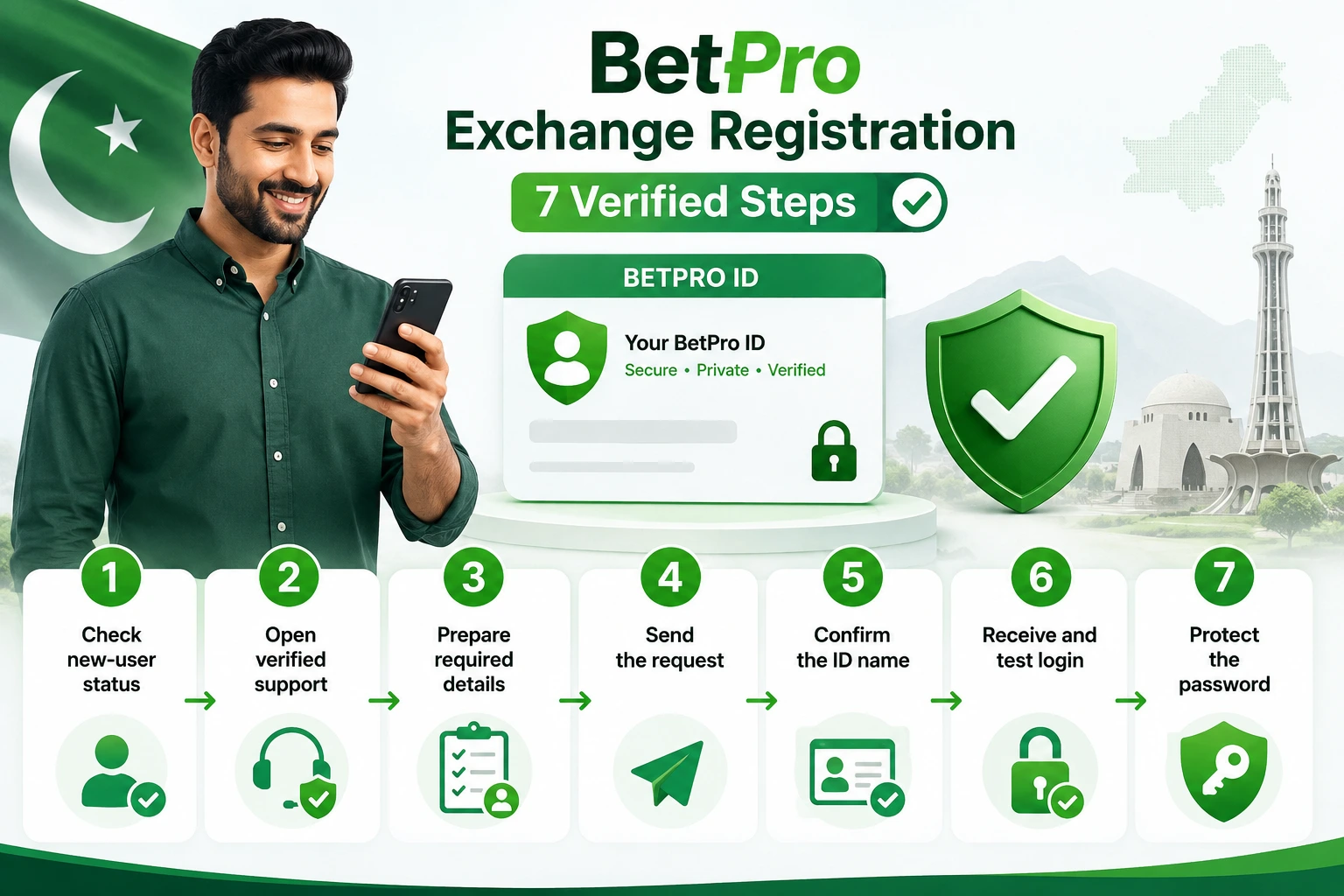
BetPro Exchange registration is for a new user who has never received a BetPro ID. Start from the verified setup route on BetPro-ID.PK. Send your name, preferred BetPro ID name, and active WhatsApp number. Keep backup ID names ready.
New ID creation is free. You do not need to deposit before you receive and test the login details. A complete request normally takes about five minutes after support receives all required details. This is an estimate, not a fixed promise.
The approved process does not confirm a public automatic registration form. It also does not require an app or APK for the basic request. Receive the ID first. Then use an approved app or trusted browser route.
Register only when you are new. Log in when you already have an ID and password. Use password help when you forget the password. Ask verified support to check an inactive or failing ID.
Never share a password, OTP, bank PIN, wallet PIN, email password, phone lock code, or remote-access code. Use a device you control. This guide is for adults aged 18 or older. Betting can cause financial loss, so set a strict limit before adding money.
Context
What Is BetPro Exchange Registration?
BetPro Exchange registration means requesting a new BetPro ID for Exchange access. Some users also search for BetPro Exchange register, BetPro Exchange online registration, or BetPro registration in Pakistan. These phrases usually describe the same first-time setup need.
The result is an assigned BetPro ID and an initial password. The ID identifies the user. The password protects access. You need both details for the first login.
BetPro-ID.PK provides independent, dealer-based support. The website explains the process and links users to a verified support route. It does not claim that a browser form creates the ID automatically.
This difference protects the article’s purpose. The guide explains what to prepare, what to share, what not to share, and what happens next. The Create ID page remains the direct action page.
BPExch and BetPro Exchange can appear as name variations in Pakistan searches. It does not publish an alternative Exchange domain or direct login doorway.
A clear registration guide must also show its limits. Registration is not login recovery. It is not an APK download. It is not a deposit request. It is not Wallet registration.
The goal is simple. Help a new user complete the correct setup safely. Help an existing user avoid a duplicate ID.
Who Should Register?
Register when you have never received a BetPro ID.
Before starting, search your old WhatsApp chats, saved notes, password managers, browser logins, and dealer messages. Check an older phone if you still control it.
An existing user should not register again because one login attempt failed. A wrong password, saved typing error, weak connection, changed browser, or inactive ID may cause the problem.
A changed phone does not normally require a new ID. The same assigned BetPro ID and password can work across supported access points.
A forgotten password also does not require fresh registration. Contact the assigned dealer first. Use the BetPro ID password guide for the approved recovery path.
Ask support for an ID-status check when correct details still fail. Use app help when an app does not open. Use login guidance when the page or saved details cause confusion.
Use the Exchange login-or-signup decision guide when you are unsure. It helps you choose login, signup, password help, or status support.
Only adults aged 18 or older should use this guide. Do not create an ID for a child. Do not create one for another person without clear consent.
Is There a Public Registration Form?
The approved setup does not confirm a public automatic BetPro Exchange registration form.
A new user sends three required details through the verified support route. These are the user’s name, preferred BetPro ID name, and active WhatsApp number.
An unknown form may ask for more. It may request a password, OTP, banking login, card details, wallet PIN, identity document, or remote-access code. Do not provide these items for the basic ID request.
A clean design does not prove that a form is safe. A copied logo does not prove ownership. A familiar colour or brand name does not verify the page.
Start from BetPro-ID.PK. Open the published support route. Check the website address before continuing.
Do not use a form copied into a social post or message. Do not follow a public comment that promises instant registration.
Support-assisted registration may feel different from a normal website form. However, it lets the user send only the approved details and confirm the chosen ID name directly.
What Registration Includes
Registration gives a new user an assigned BetPro ID and an initial password. Support confirms the chosen ID name and sends the login details.
ID creation is free. No registration fee is required. A later deposit is separate and optional.
Normal setup takes about five minutes after complete details arrive. Timing can vary. Support may need another ID name or more complete information.
Registration includes a first-login test. The user should confirm that the ID and password work before making any payment decision.
Registration does not include guaranteed bonus funds, profit, deposit success, withdrawal success, or betting results. It does not provide legal approval for every user or location.
The process also does not confirm a separate Pro tier, public registration number, app-only setup method, or fixed activation time.
What Works
BetPro Exchange Registration in Seven Safe Steps
Follow these steps in order. Good preparation reduces delays, typing mistakes, duplicate IDs, unsafe contacts, and exposed login details.
Step 1: Confirm That You Need Registration
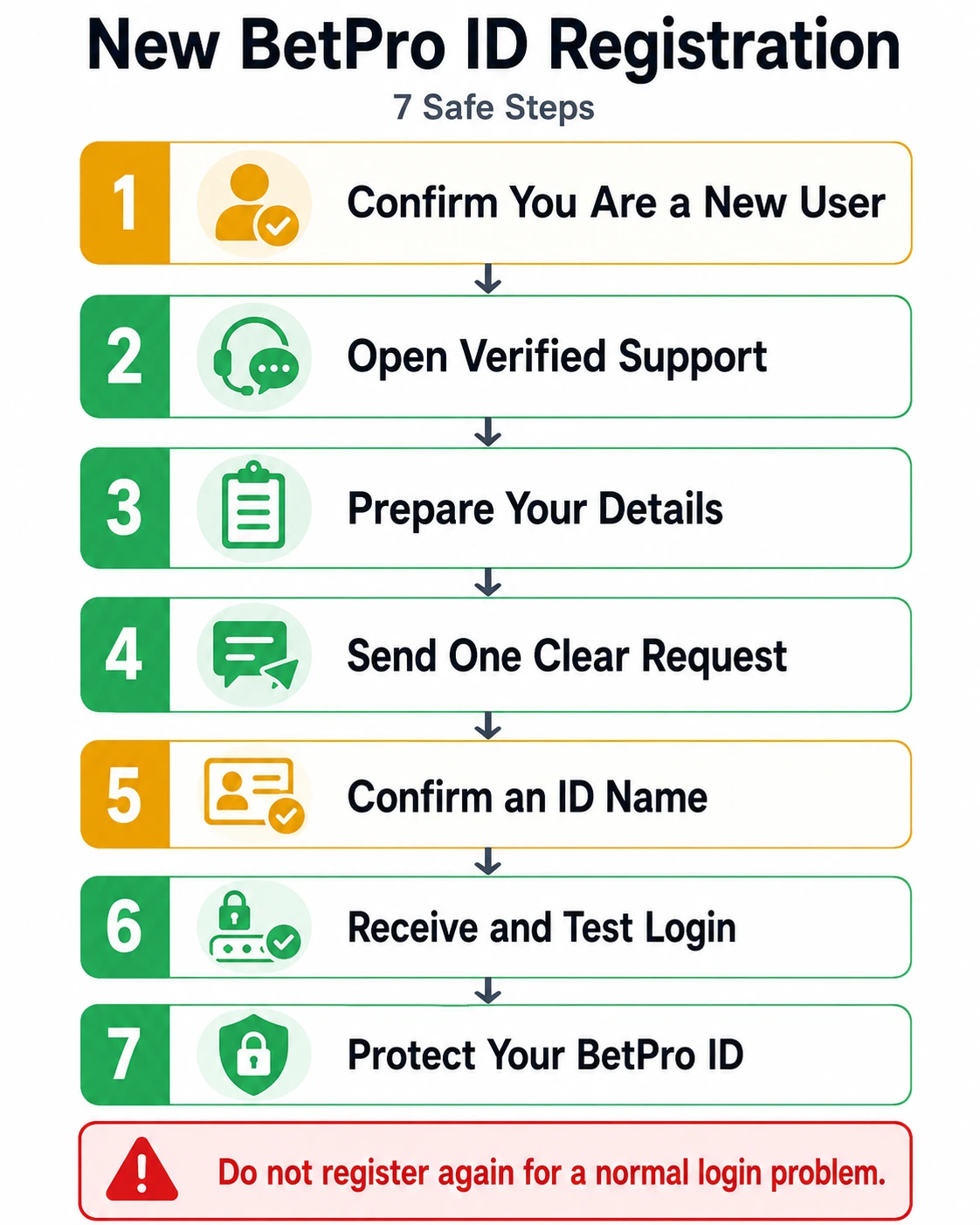
Start with one question: do you already have a BetPro ID?
If yes, stop the registration process. Find the saved ID and use the correct login, password, or status route.
Search old WhatsApp chats. Check saved notes, browser usernames, password managers, and messages from your assigned dealer.
Read every character carefully. A zero may look like the letter O. The number one may look like a lowercase L. Extra spaces can also cause a failed login.
Do not guess the ID. Compare it with the original support message.
A failed login does not prove that registration is needed. The password may be old. The browser may fill another user’s details. The connection may be weak. The ID may need a status check.
A changed device does not normally create a new identity. Keep the existing BetPro ID across supported access points.
Register only when no existing ID belongs to you or verified support confirms a fresh setup.
Step 2: Open the Verified Support Route
Start at BetPro-ID.PK. Open the published BetPro ID setup page or verified support page.
Check the website address before opening any chat or support link. Do not start from a forwarded screenshot, public comment, unknown profile, or copied contact card.
A copied logo is easy to make. A person can also copy a name, profile image, and support message style.
Do not search social media for random registration numbers. The approved source material does not confirm a public BetPro Exchange registration number.
Avoid changing lists of alternative domains. This article does not publish or approve them.
You do not need to install an app or APK to send the basic request. You do not need to allow screen sharing or remote phone control.
Use a phone you control. Use a stable internet connection. Keep the support chat private.
Do not move to a new contact because someone promises faster setup. Safety matters more than speed.
Step 3: Prepare the Required Details
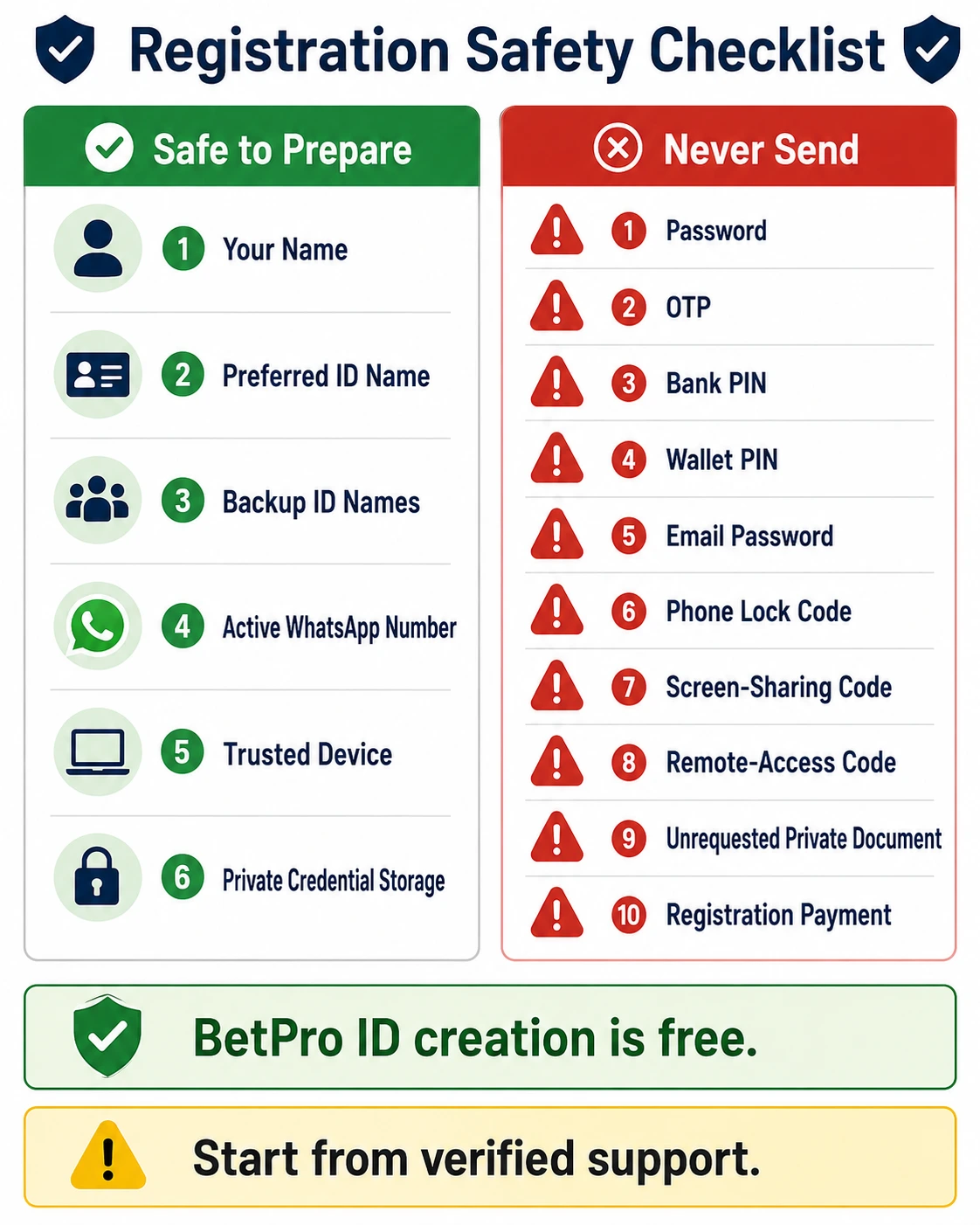
Prepare these three details before contacting support:
- Your name
- Your preferred BetPro ID name
- Your active WhatsApp number
Write your name clearly. Use the same spelling throughout the request.
Choose an ID name that is short and easy to type. Avoid long number strings, confusing symbols, or personal details that you may not want others to see.
Do not use your password as the ID name. The ID is the visible login name. The password must remain private.
Prepare one or two backup ID names. Your first choice may already belong to another user. Backup options can prevent extra delay.
Use an active WhatsApp number that you control. Support may use the same chat to confirm the final ID name and send the login details.
Check the number before sending it. One wrong digit may stop support from matching the request.
Do not add payment details to the basic registration message. Do not send a bank password, card PIN, wallet PIN, email password, or payment login.
Never send an OTP, phone lock code, screen-sharing code, or remote-access code.
Keep the required details together. One complete message is easier to review than many short messages.
This small preparation step improves speed without using unsafe shortcuts.
Step 4: Send a Clear Registration Request
Send one clear message after checking the details.
You can use this example:
Hello. I need BetPro Exchange registration. My name is ____. My preferred BetPro ID name is ____. My active WhatsApp number is ____. Please confirm the current registration steps.
Read the message before sending it. Check the name, chosen ID, and WhatsApp number.
Keep the wording simple. Support only needs to know that you are a new user and want a BetPro ID.
Stay in the same verified chat. Do not send the same request to several unknown contacts. Multiple conversations can create mixed instructions or duplicate attempts.
Avoid sending one word at a time. A complete first message helps support understand the request quickly.
Do not send a password, OTP, bank PIN, wallet PIN, email password, phone lock code, or remote-access code.
Do not pay a registration fee. BetPro ID creation is free.
Do not make a deposit during the setup request. Receive and test the login details first. Registration and funding are separate steps.
If support asks for an alternative ID name, reply in the same conversation. Do not restart the process elsewhere.
This is the safest answer to “how to register BetPro in Pakistan.” Use verified support, share only approved details, and keep the request clear.
Step 5: Confirm an Available ID Name
Support checks whether the preferred ID name is available.
Another user may already have your first choice. If that happens, choose one of your backup names.
Check the final spelling before confirming it. A small mistake can cause confusion during the first login.
Keep the final ID easy to type on a phone. Avoid two names that differ by only one hard-to-see character.
Do not ask for several IDs at once. One new user needs one clear assigned ID.
Save the confirmed ID name privately. Do not post it in a group or public comment.
A complete request normally takes about five minutes after support receives the required details. Treat this timing as an estimate.
The timing begins after your name, preferred ID name, and active WhatsApp number arrive. It does not begin when you first open the page.
Missing information may add time. Busy support may add time. An unavailable ID name may also add time.
Do not send the request every few seconds. Repeated messages make the conversation harder to follow.
Wait for support. Send one polite follow-up when needed. Do not trust an unknown person who promises instant activation.
Step 6: Receive and Test the Login Details
Support sends the assigned BetPro ID and initial password after completing the setup.
Read both details carefully. Check every letter and number. Look for zero and O. Check one and lowercase L.
Remove spaces before or after the ID. Keep capital letters exactly as shown.
Save the ID and password in a private place. Use a trusted password manager or another secure method.
Do not post a screenshot in a group. Do not forward the credentials to friends. Do not save the password in a public note.
Open a trusted access method. Enter the assigned ID and password yourself.
Test the login before depositing. Confirm that the ID opens correctly. This step separates registration issues from later payment questions.
If login fails, check the spelling, connection, and saved browser details. Do not keep guessing the password.
Read how a BetPro ID works for the full journey from setup to access and support.
Use a personal device when possible. Avoid public computers and public Wi-Fi. If you use a shared device, do not save the password.
Keep the original support chat. It can help confirm the assigned ID later.
Step 7: Protect the New BetPro ID
Protect the ID as soon as the first login works.
Change the initial password through Profile when that option is available and you know the current password.
Choose a unique password. Do not reuse an email, banking, social media, or phone password.
Do not use the ID name as the password. Avoid your name, phone number, birth date, or simple number patterns.
A longer password with unrelated words, numbers, and symbols is harder to guess. Keep it private.
Save the credentials under a clear label. Do not mix BetPro ID details with BPExch Wallet credentials.
Never share the password, OTP, bank PIN, wallet PIN, email password, phone lock code, or remote-control code.
Log out after using a shared device. Remove saved login details when another person can use the browser.
If you forget the password, contact the assigned dealer first. Do not request a second ID as a shortcut.
Read the BetPro ID security guide for more protection checks.
One secure ID is easier to manage than two mixed IDs. Fix the existing ID whenever possible.
BetPro Exchange Registration Checklist
Prepare these items:
- Your name
- One preferred ID name
- One or two backup ID names
- An active WhatsApp number
- A trusted phone
- A stable internet connection
- Private credential storage
Complete this check before sending the request:
- Did you start from BetPro-ID.PK?
- Did you open the published support route?
- Is your name clear?
- Is the WhatsApp number correct?
- Is the ID name easy to type?
- Did you remove every private secret?
- Are you sending one complete message?
Never provide:
- A password
- An OTP
- A bank PIN
- A wallet PIN
- An email password
- A phone lock code
- A screen-sharing code
- A remote-access code
- An unrequested private document
- A registration payment
This checklist helps both users and support. It reduces extra questions and prevents unsafe oversharing.
Keep the list beside you during registration. Check each item once. Then send the request and keep the same verified conversation.
Is BetPro Exchange Registration Free?
Yes. New BetPro ID creation is free.
You do not need to pay a registration charge. You also do not need to deposit before support sends the ID and password.
A deposit is a separate and optional funding step. “Free registration” does not mean free betting funds, a guaranteed bonus, or guaranteed profit.
Do not pay an unknown person who promises faster ID creation. Do not pay an “activation fee” without clear confirmation from verified support.
Receive the credentials first. Test the login. Then decide whether to continue.
Do You Need an App or APK?
No app or APK is required to send the basic registration request.
Open the verified setup route. Send the required details. Receive the BetPro ID and password first.
After that, you may use an approved app or trusted browser route. Approved app access comes through verified support.
Do not install a random APK from an unknown website, message, or public comment. A copied logo does not prove that the file is safe.
An app is an access method. It does not replace the assigned BetPro ID.
Detailed download, installation, permissions, version, and app-error guidance belongs to app content.
If an app fails after registration, keep the same ID. Test a trusted browser route or ask support for approved app help.
BetPro Exchange Registration Versus Login
Register when you have never received a BetPro ID.
Log in when you already have an assigned ID and password.
Use password help when you know the ID but forgot the password. Contact the assigned dealer first.
Ask for status support when correct details still fail or the ID appears inactive, locked, or disabled.
Keep the existing ID after changing phones or browsers. Use app help when an app fails.
Existing users should not register again for a normal access problem.
Read the Exchange login-or-signup guide for the full four-way decision.
Trade-offs
Common Registration Errors
Small errors can slow registration.
A missing name creates an incomplete request. A wrong WhatsApp number can stop support from matching the user.
An unclear preferred ID name may need extra questions. An unavailable name may require another choice.
Typing mistakes can cause the first login to fail. Check the final ID and password character by character.
Several one-word messages can hide important details. Send one complete request.
Contacting several dealers can create mixed instructions or duplicate attempts. Stay in one verified conversation.
Losing the original support chat can make later help harder. Save it.
Creating another ID after a login error can mix passwords, browser autofill, and support records.
Most registration errors are easy to prevent. Prepare the details, check the route, and read the final credentials carefully.
Public Forms Versus Support-Assisted Registration
A public form may feel faster because it looks familiar.
However, the approved process uses a verified support route. The user sends only the required details and can confirm the chosen ID name directly.
An unknown form may request too much information. It may also copy a logo or design.
Support-assisted registration still requires care. Check the route. Share only the approved details. Protect the credentials after delivery.
Do not choose a form only because it promises instant setup. A faster-looking route is not always safer.
Unsafe Apps, Downloads, and Numbers
Avoid random APK files, fake download buttons, unknown QR codes, copied support profiles, and public password lists.
Do not use registration numbers copied from comments, screenshots, groups, or unknown websites. This guide does not publish a public BetPro Exchange registration number.
Avoid urgent activation fees, alternative domains, screen sharing, and remote phone control.
Never provide an OTP, bank password, card PIN, wallet PIN, email password, or device lock code.
Do not trust “latest version” or “instant ID” claims without verified support.
What This Guide Cannot Confirm
This guide cannot confirm a public automatic registration form, public telephone number, app-only setup route, alternative access domain, separate Pro tier, or fixed five-minute delivery.
It cannot promise instant activation, bonus eligibility, deposit success, withdrawal success, profit, or any betting result.
It also cannot decide the legal position for every user or location. Check the rules that apply to you.
Next Steps
What to Do After Registration
Test the login first. Save the ID privately. Protect the password. Keep the original support chat.
Change a known password through Profile when needed and available.
Use login help for access errors. Use the password guide for recovery. Use app guidance for download or opening problems.
Do not create another ID without verified support advice.
Review the BetPro ID security guide before using a shared device or saving credentials.
Before Making a Deposit
Registration and funding are separate. Test the ID before adding money.
Confirm the current payment route through verified support. Set a strict spending limit.
Never borrow money to bet. Never use money needed for food, rent, bills, school, health, or family needs. Stop when you reach the limit.
Betting can cause financial and family harm. Step away and seek support when it starts affecting daily life.
FAQs
Is BetPro Exchange Registration Free in Pakistan?
Yes. New BetPro ID creation has no registration fee. A later deposit is separate and optional. Receive and test the login details before deciding whether to add money.
Is There a Public BetPro Exchange Registration Form?
The approved process does not confirm an automatic public form. Start from BetPro-ID.PK and use the published support route. Share only your name, preferred ID name, and active WhatsApp number.
Do I Need an App or APK to Register?
No. Send the basic registration request through verified support. Receive the ID first. Use only an approved app or trusted browser route afterward.
Conclusion
Ready for BetPro Exchange registration? Open the verified Create ID page. Prepare your name, preferred ID name, and active WhatsApp number. ID creation is free. No deposit is required before receiving and testing the login details.
Use verified support only. Never share a password, OTP, bank PIN, wallet PIN, email password, phone lock code, or remote-access code. Pause, check each detail, and keep the process simple. Adults aged 18 or older only. Betting can cause financial loss, so set a strict limit before adding money.
EDITORIAL REVIEW
Reviewed for clarity, safety and independent status
This article is managed by the BetPro-ID.PK Support and Editorial Desk. Content is checked before publication and updated when important facts change.