
TL;DR
The BetPro exchange app is a mobile access option for existing users. It can help users sign in on an Android phone after they confirm the current app source. Installing an APK does not create a BetPro ID, and it does not replace the normal signup or password-help process.
Use the published support route on BetPro-ID.PK to confirm the current Android source before downloading. Check the destination, file name, version, and permissions. Avoid forwarded APK files, modified apps, copied support profiles, and third-party listings that have not been checked.
Use the same BetPro ID and private password on supported app and browser access. Test the browser when the app will not install, opens to a blank screen, closes, or rejects details that previously worked. Do not create another ID for a normal app problem.
An Android APK cannot run on an iPhone. Windows and macOS users should normally use supported browser access instead of unknown desktop installers.
Never share a password, OTP, wallet PIN, banking password, card PIN, email password, or remote-access code. Keep normal Android protection active. Adults aged 18 or older only. Betting can cause financial loss, so set a strict limit, avoid borrowed money, and never chase losses.
Context
What Is the BetPro Exchange App?
The BetPro exchange app is an Android access option for a user who already has a BetPro ID. Depending on the current supported setup, it may provide login, account information, sports or live-market access, transaction history, and basic settings.
The app is not a separate account. It does not create a new BetPro ID simply because a user installs it. New users should follow the dealer-assisted Create ID guide before trying to log in.
The phrase “BetPro app” is often used for the same broad app intent. This page owns both betpro exchange app and betpro app searches because users usually want the same thing: a checked download route, Android installation help, login steps, version checks, or a browser alternative.
Do not assume that every application using a familiar name or logo belongs to the supported platform. File names can be copied. Logos can be reused. A listing can use words such as “official,” “latest,” “original,” or “secure” without proving anything.
The safest starting point is the app page on BetPro-ID.PK and the support route published there. This website provides independent dealer-based guidance. It is not the corporate BetPro website.
Who Should Use the App?
The app suits an existing user who has a working BetPro ID, knows the current password, uses a compatible Android phone, and has confirmed the current source.
Use the app when:
- You want repeat mobile access on your own Android device.
- The current APK source and version have been checked.
- Your phone has enough storage and compatible Android software.
- The requested permissions match visible app functions.
- You understand how to remove unnecessary install permissions afterward.
Do not use app installation as the first answer when you have no ID, forgot the password, received an inactive-ID message, or need payment help. Those needs have different owner pages.
A user with no ID should open the Create ID page. A forgotten password belongs to the password guide. A failed existing login belongs to Login Help. Payment and withdrawal questions belong to the dedicated payment guidance.
App or Browser: Which Route Is Better?
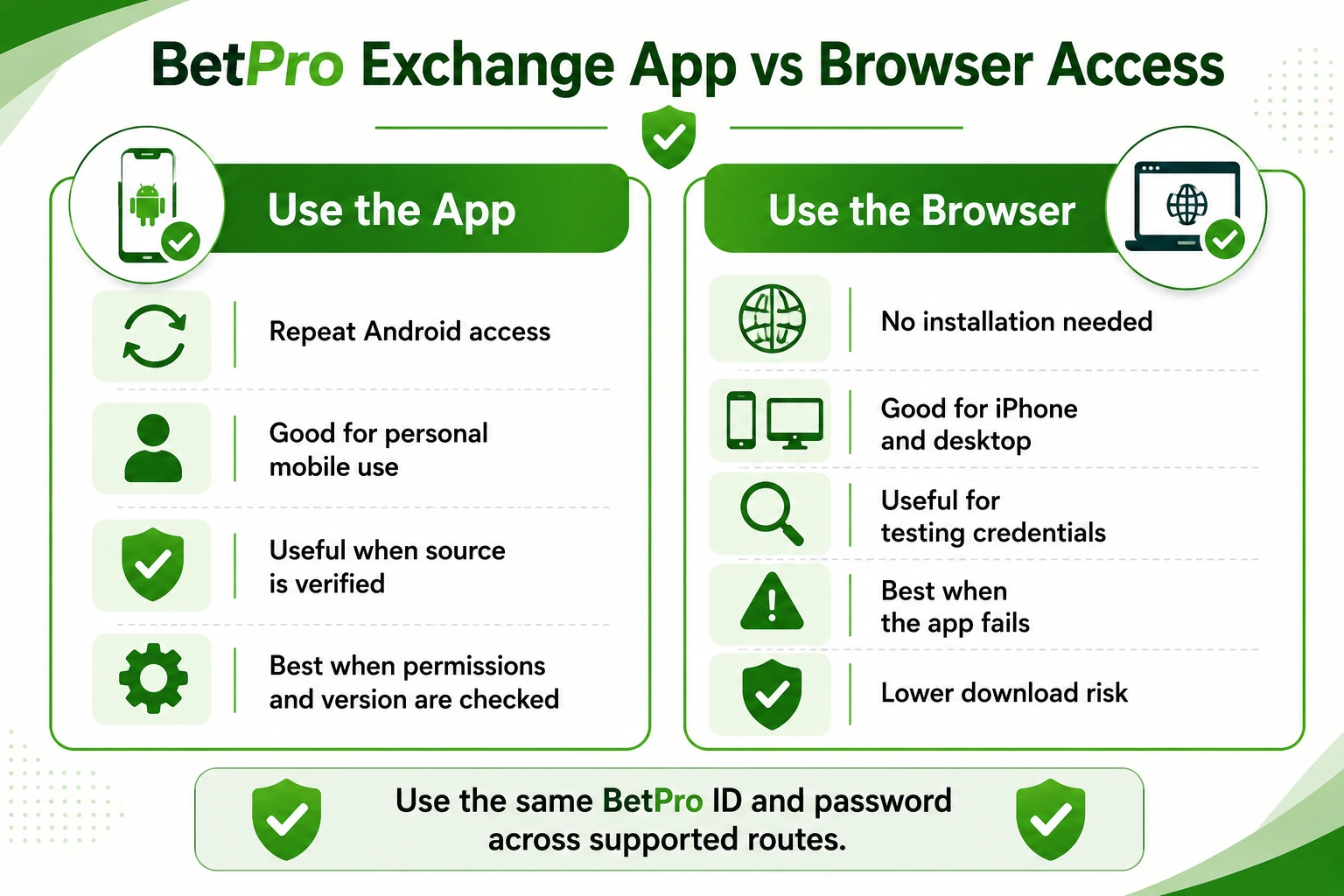
Neither route is always better. The practical choice depends on the device, source confidence, storage, and current app condition.
Use the app when the APK source is checked, the phone is compatible, and you prefer repeat Android access. Use the browser when you want no installation, use an iPhone or computer, have limited storage, or need to test whether the account credentials still work.
The same BetPro ID and password can normally work across supported app and browser routes. That makes the browser a useful test. When the browser accepts the same details but the app fails, the problem likely sits with the APK, version, storage, device settings, permissions, or cached data.
A private browser window can help test old cookies or saved sessions. It does not make an unsafe address trustworthy. Always start from a checked route.
What This Guide Does Not Promise
This guide does not publish a permanent list of changing access domains. It does not provide VPN or bypass instructions. It does not promise that one APK will work on every Android phone.
It also does not guarantee that an app is safe simply because it appears on APKPure, Uptodown, the Play Store, the App Store, or another listing. A store result may help discovery, but it does not replace source, package, version, and permission checks.
The page does not confirm a fixed latest-version number, free withdrawals, instant activation, guaranteed password recovery, guaranteed profit, or legal approval for every person and location.
What Works
1. Confirm the Current BetPro Exchange App Source
Do not install the first file shown in search results. Start from BetPro-ID.PK and use the published support route to confirm the current Android source.
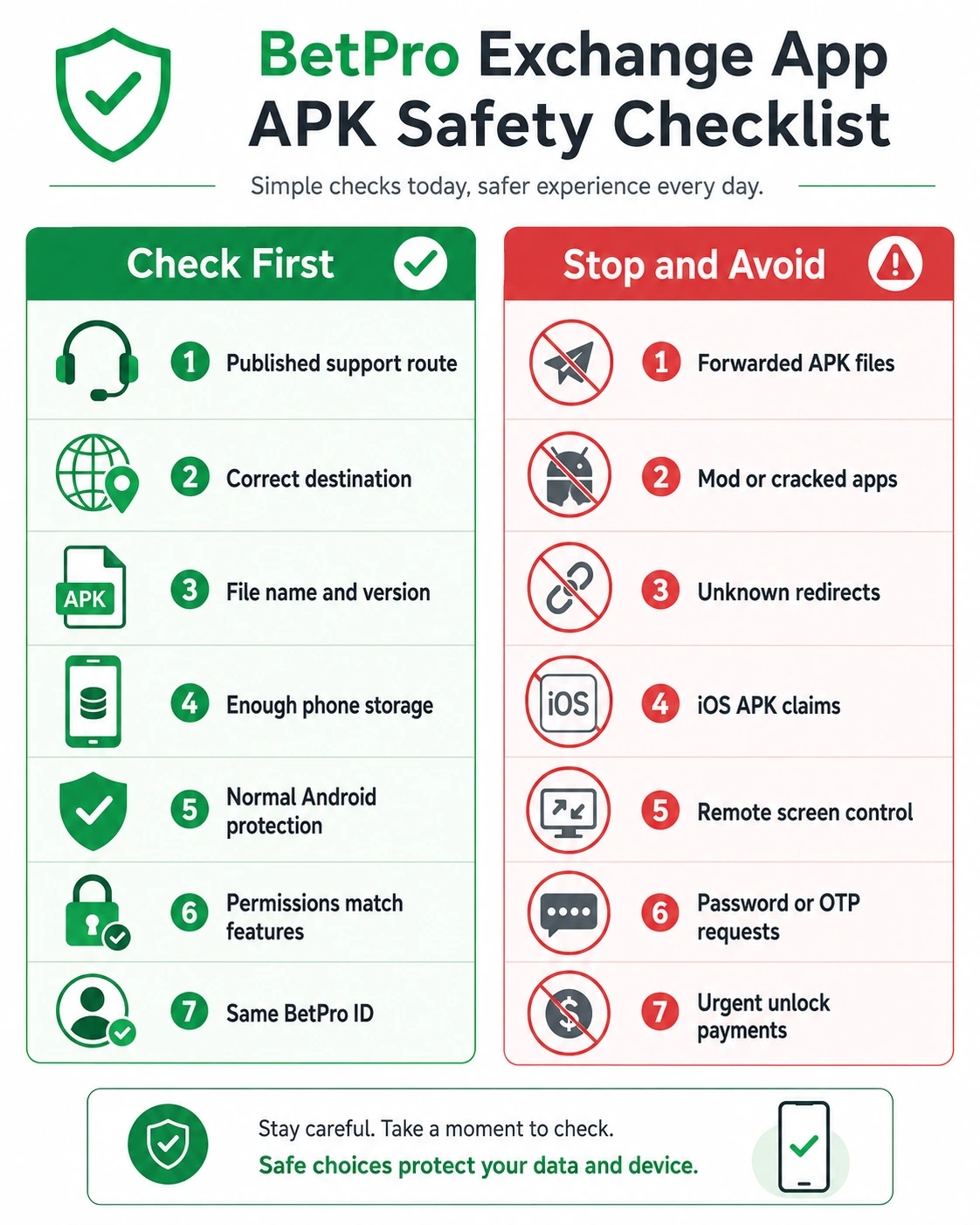
Ask for the current download destination, file name, and supported version. Compare the reply with the page you open. Stop when the link changes unexpectedly or passes through a shortened address that hides the final destination.
Check the complete destination before downloading. Look for strange spelling, added words, unusual endings, or redirects to unrelated pages. A copied page may imitate colors, buttons, or logos while sending credentials elsewhere.
Keep one verified support conversation. Do not move to a new number or profile only because it uses the same name, logo, or display photograph.
Be careful with messages that create pressure. “Download now,” “pay to unlock,” “share your code,” and “install this special version” are warning signs when they arrive through an unverified contact.
A support person should not need your private password, OTP, banking password, wallet PIN, card PIN, email password, or remote-access code to confirm a download source.
Save the verified app page only after checking it. Recheck the route before a later update because app sources and version details can change.
2. Understand What an APK File Is
An APK is an Android installation file. It can install an app outside the normal store process. That does not make every APK unsafe, but it means the user must perform extra checks.
A file can be renamed. A modified file can keep the same icon and title as a known app. Words such as “latest version,” “2026,” “official,” “original,” “premium,” or “updated” are not technical proof.
Treat cracked, hacked, unlocked, mod, or premium APK labels as danger signs. Modified apps can change login screens, inject adverts, request unusual permissions, steal credentials, or redirect payments.
Third-party services such as APKPure or Uptodown may display app packages, but their presence does not prove that a file is the currently supported BetPro exchange app. Compare the package details and confirm the source before installation.
Do not install several old and new versions at once. Multiple copies can cause login confusion, update conflicts, storage problems, or use of the wrong app icon.
3. Check the File Before Installation
Wait for the download to finish. An incomplete file may fail to open or may produce a package error.
Review the file name and version. Compare them with the information supplied through the verified support route. Do not continue when the name differs, the version looks unexplained, or the source page changes during the process.
Use Android’s normal security tools. Do not disable all phone protection because a page tells you to do so.
Android may ask you to allow installation from the browser or file manager used for the download. Give that permission only to the specific app handling the verified file. Remove the permission after installation finishes.
Check free storage before installing. Low storage can cause failed installation, app crashes, slow opening, or incomplete updates.
Review the app name and icon shown by Android. Stop when the installer shows an unfamiliar name, asks to replace an unrelated app, or requests device-control rights before installation.
After installation, open the app without entering credentials immediately. Look at the screen, language, buttons, and navigation. Close it when anything appears unrelated, broken, or suspicious.
4. Review Every Android Permission
Read every permission request. Do not tap Allow simply because the app blocks the next screen.
Be cautious when a login app requests SMS access, call history, phone control, accessibility control, device administrator rights, full file access, contact access, microphone use, camera use, or permission to install other apps.
Some permissions may support a visible function, but the reason should be clear. A basic login should not require permanent control over the phone.
Do not grant accessibility or screen-control access to an unknown app. These permissions can allow software to read screens, tap buttons, change settings, or capture sensitive information.
Do not allow permanent “install other apps” permission. Remove the temporary unknown-app permission after installation.
Review broad storage access carefully. Modern Android versions often let users choose limited access rather than all files.
Allow camera or microphone access only when a visible feature needs it. Remove the permission when the feature is no longer used.
Stop when the app asks to become device administrator, prevent removal, change security settings, or control other apps without a clear verified reason.
Open Android settings after installation and review the full permission list. Remove anything that does not match normal account access.
5. Complete the BetPro Exchange App Login
Open the checked app and confirm that it is the same application whose source you verified.
Enter the assigned BetPro ID. Check letters, numbers, capital characters, and extra spaces. A WhatsApp number is not automatically the BetPro ID.
Enter the current private password. Check Caps Lock, keyboard language, saved passwords, and copied spaces.
Select Login once. Wait for the response instead of tapping repeatedly. Repeated attempts can hide the original error or cause extra confusion.
Check the account name and visible information after login. Log out immediately when the account looks unfamiliar.
Never send the password to support. Support may need the BetPro ID, phone model, Android version, file name, and exact error, but the password must remain private.
Never enter an OTP, mobile-wallet PIN, banking password, email password, remote-access code, or full payment details into an unfamiliar app screen.
Do not create another ID because the app rejects the login. Test the same credentials through a supported browser first. A successful browser login points to an app, version, device, or cache problem rather than an account-creation problem.
6. Check the Latest Version Without Guessing
Search results may show old years, “latest version,” “new version,” or “2026 APK.” These labels do not prove freshness.
Ask the published support route for the current supported version. Compare the version information before replacing a working app.
An old APK may stop opening, reject login, show a blank screen, use an outdated route, or become incompatible with a newer Android release.
Use an old version only when verified support confirms that a specific phone needs it. Do not install an old file simply because it worked for another user.
Before updating, store the BetPro ID privately, confirm the current password, close the old app, and check available storage. Keep one verified source.
After updating, open the app and confirm the correct account before using any account or payment feature.
Do not treat an in-app update message as automatic proof. Confirm the version and source through the same published support route before installing a replacement file.
7. Fix Common BetPro App Problems
Check one issue at a time. Use supported browser login while you identify the app problem.
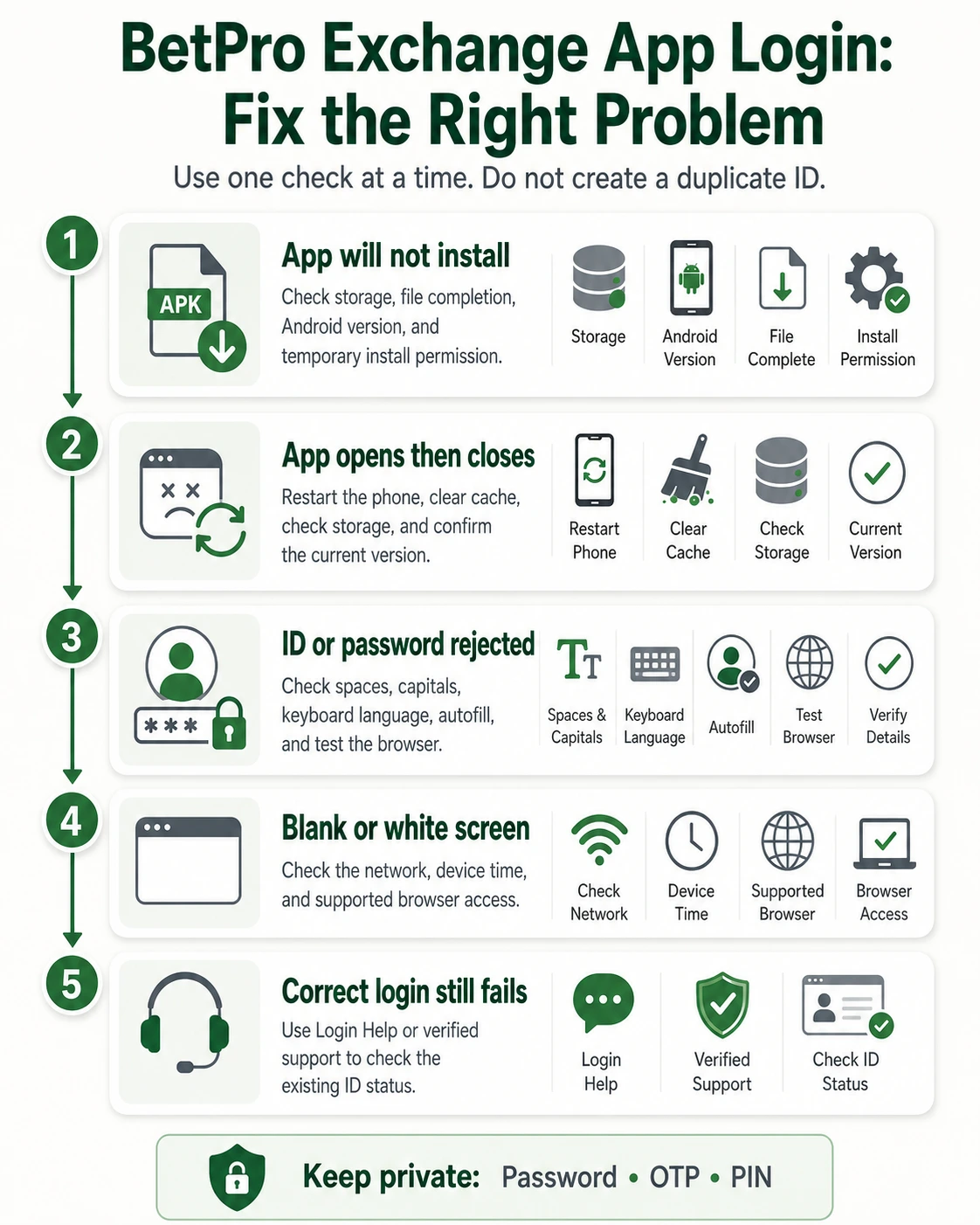
APK will not install: Confirm that the download finished. Check free storage, Android compatibility, existing app copies, and temporary unknown-source permission.
App opens and closes: Restart the phone. Close other apps. Clear the app cache. Check storage and confirm the current version.
Blank or white screen: Switch to another trusted network. Set the device date and time automatically. Reopen the app and test browser login.
ID or password rejected: Check spelling, spaces, Caps Lock, keyboard language, and saved old passwords. Test the same credentials on the web.
Update message appears: Do not install immediately. Confirm the version and update source.
App works on one phone only: Compare Android versions, storage, permissions, network settings, security tools, and device compatibility.
Login works but account looks wrong: Log out. Recheck the BetPro ID. Remove saved credentials and contact verified support without sharing the password.
App becomes slow: Close unused apps, free storage, clear cache, restart the phone, and check the connection.
When the browser also fails with the same correct details, use BetPro ID Login Help or the published support route to check account status.
8. Use the Right Route on iPhone or PC
An Android APK cannot run on an iPhone. Avoid files labelled “iOS APK.” That phrase combines two incompatible formats.
Use supported browser access on iPhone unless a verified iOS option is published. Do not install unknown profiles, certificates, or configuration files to force access.
On Windows or macOS, use the supported web login. Avoid random desktop installers, browser extensions, emulators, or “BetPro app for PC” programs unless the source and need are clearly verified.
A browser usually offers the simplest route for a computer. It avoids unknown desktop software and lets users test the same BetPro ID and password.
9. Keep Signup, Password, and Wallet Tasks Separate
Installing the BetPro exchange app does not create an account. New users should request a BetPro ID through the Create ID guide.
A forgotten password does not require another download or another ID. Use the password-help guide.
An inactive or locked ID needs a status check. Use Login Help or the published support route.
Wallet and withdrawal searches have different intent. Do not install a separate unknown “wallet app” because it uses familiar words. Use the dedicated payment guidance and keep wallet PINs, banking passwords, and OTPs private.
10. Follow a Final Safety Checklist
Before downloading:
- Start from BetPro-ID.PK.
- Confirm the current source through published support.
- Check the destination, file name, and version.
- Avoid forwarded, shortened, modified, and copied links.
- Keep normal Android protection active.
Before login:
- Confirm the installed app.
- Review permissions.
- Use the assigned BetPro ID.
- Use the current private password.
- Remove extra spaces and old autofill details.
- Test the browser when the app fails.
Never provide:
- Your BetPro password
- An OTP or verification code
- A wallet or banking PIN
- An email or banking password
- A card PIN or full card details
- A remote-access or screen-control code
Stop when the source, permissions, or screen behaviour does not match what you expected. A slower verified route is safer than an urgent shortcut.
11. Prepare the Phone Before Downloading
Good preparation reduces failed installations and repeated downloads. Check the phone model, Android version, free storage, battery level, and network before you start.
Use a trusted Wi-Fi or mobile connection. Avoid public networks when you can use a private connection. A weak or interrupted download may leave an incomplete APK.
Close unused apps and restart the phone when storage or memory is low. Keep enough free space for the file, installation process, and normal app data.
Set the device date and time automatically. Incorrect time can cause secure connections, login sessions, or update checks to fail.
Write down the assigned BetPro ID in private storage and confirm that you know the current password. Do not place either detail in a public note or screenshot.
Take a screenshot of any error only after hiding the ID, password field, phone number, balance, payment details, and private notifications.
12. Recognize a Fake or Modified App
A fake app may copy the name, logo, colors, and login design. Look beyond appearance carefully.
Stop when the app opens unrelated adverts, asks for money before login, redirects to unfamiliar pages, requests remote control, or demands an OTP to “verify” installation.
Watch for poor spelling, broken buttons, unrelated permissions, repeated pop-ups, forced updates, or instructions to disable every Android security feature.
An app that asks for a banking password, wallet PIN, card PIN, email password, or full payment information during basic login should not be trusted.
Remove a suspicious app, restore normal security settings, and change any exposed password through a trusted route. Contact published support and explain what happened without sending private codes.
13. Use Simple Roman Urdu Steps
Source pehle verify karein. Random website, group, ya forwarded link se APK download na karein.
File ka naam aur version check karein. Android security completely off na karein. Har permission ko read karein.
App open karne ke baad apni assigned BetPro ID aur private password enter karein. OTP, wallet PIN, banking password, ya remote-access code share na karein.
App kaam na kare to supported browser login test karein. Password bhool gaye hon to naya ID banane ke bajaye password-help route use karein.
Trade-offs
App Convenience Versus Source Risk
The app can make repeat Android access quicker. It can also reduce the need to open a browser route each time.
The trade-off is that an APK requires source, file, version, compatibility, and permission checks. A browser avoids installation but may still expose users to copied pages when the address is not checked.
Security depends on the full route, not the format alone. A verified app on a protected phone can be practical. An unverified APK can be dangerous. A checked browser route can be simple. A copied browser page can steal credentials.
Latest Version Versus Device Compatibility
A newer version may fix errors or improve compatibility. It may also require a newer Android release or more storage.
An older version may work on one phone but fail on another. It may use an outdated route or miss important fixes.
Do not choose by year label alone. Confirm the current supported version and use an older file only when verified support gives a device-specific reason.
Third-Party Listings Versus Verified Support
APKPure, Uptodown, stores, and search results can make files easy to find. Easy discovery is not the same as verified support.
A third-party listing may show an old, renamed, or different package. Use it only after comparing the package details and confirming the source.
The published support route gives a clearer path for checking current source and version information. It still does not justify sharing passwords or private codes.
What This Page Cannot Confirm
This page cannot confirm a permanent download URL, fixed latest-version number, universal Android compatibility, guaranteed installation, or instant login.
It cannot confirm that every BetPro-named app is connected to the supported platform. It cannot approve mod APKs, cracked files, iOS APKs, unknown PC installers, or changing alternative domains.
It also cannot promise account recovery, withdrawals, profit, income, or a betting result.
Next Steps
Choose the Correct Action
Existing Android user: confirm the current app source and version, then follow the checked installation and login steps.
Existing user with an app problem: test supported browser access and work through one troubleshooting check at a time.
New user: open Create ID before downloading.
Forgotten password: use the password guide.
Inactive or rejected ID: use Login Help or the published support route.
iPhone or computer user: use supported browser access instead of an Android APK or unknown desktop installer.
Before Using Payment Features
Confirm the correct account after login. Check current payment instructions through verified guidance. Never share a wallet PIN, banking password, card PIN, OTP, or remote access to a payment app.
Set a strict spending limit. Never use borrowed money. Never chase losses. Stop when betting affects bills, food, health, work, sleep, study, or family life.
FAQs
What Is the BetPro App?
The BetPro app is a mobile access option for an existing BetPro ID. It may provide supported account and market features. Installing it does not automatically create a new ID.
How Do I Download the BetPro Exchange App Safely?
Use the support route published on BetPro-ID.PK to confirm the current Android source. Check the destination, file name, version, and permissions before installing.
Can I Use the BetPro Exchange App on iPhone or PC?
An Android APK cannot run on iPhone. Windows, macOS, and iPhone users should normally use supported browser access instead of unknown installers or files labelled “iOS APK.”
Conclusion
Ready to use the BetPro exchange app? Confirm the current Android source through the support route published on BetPro-ID.PK. Check the file, version, and permissions before installation. Then log in with the assigned BetPro ID and private password.
Never share a password, OTP, wallet PIN, banking password, email password, or remote-access code. Adults aged 18 or older only. Betting can cause financial loss, so set a strict limit and never use borrowed money.
EDITORIAL REVIEW
Reviewed for clarity, safety and independent status
This article is managed by the BetPro-ID.PK Support and Editorial Desk. Content is checked before publication and updated when important facts change.