
TL;DR
A BetPro app download should start with source verification, not with the first APK link shown in search results. BetPro-ID.PK is an independent support website for adults in Pakistan, and it does not claim to be the corporate BetPro website. If you want the app, first confirm the current Android source through the verified support route published on this site. Then compare the file name, version, and destination before installation.
For most users, the safest sequence is simple: confirm the source, keep Android protection active, download the complete APK, review the installation prompt, check permissions, and log in only after the app looks consistent with the verified source. Never send your BetPro ID password, OTP, wallet PIN, banking password, email password, or remote-access code to someone who offers to install or test the app for you.
The same BetPro ID and private password normally work across supported app and browser access. If the app is unavailable or will not install, use supported browser access while you troubleshoot. For the broader app, login, browser, permissions, and device guide, use the complete BetPro App guide.
Context
What does BetPro app download mean in Pakistan?
People searching for BetPro app download are usually trying to do one of four things: find the current Android app, obtain an APK file, update an older installation, or get back into an existing BetPro ID from a phone. Those tasks sound similar, but they are not identical.
A download is only the file-transfer step. It does not create a BetPro ID, reset a forgotten password, confirm an account, or prove that a file is genuine. That distinction matters because search results may mix APK pages, old versions, copied brand pages, app-store listings, videos, and third-party download sites.
For BetPro-ID.PK, the role of this article is narrow. It supports the main BetPro App pillar by concentrating on the download decision: where to verify the current source, what to inspect before installing, how to handle Android warnings, and when to stop and use browser access instead.
New users who still need an ID should use the Create ID guide. Existing users who already have an ID but cannot sign in should use BetPro ID Login Help. A download should not be used as a substitute for either process.
BetPro app download versus BetPro exchange app download
Search tools show both betpro app download and betpro exchange app download because users often use BetPro and BetPro Exchange language for the same general app-access intent. The important SEO and user-experience point is not to create a different download route for every wording variation.
This supporting guide treats those phrases as one Android download family. The main app pillar remains the broader owner for BetPro app and BetPro Exchange app information. This article answers the narrower question: how should an adult user in Pakistan approach a download without trusting an unverified file?
That approach also prevents confusion with unrelated searches such as BetPro Wallet, BetPro Me, BetPro Green, or similarly named apps. A familiar word, logo, or icon is not enough to show that an app belongs to the access route you intend to use.
How this supporting guide fits the BetPro App pillar
This article is intentionally narrower than the main app page. The pillar explains the BetPro App experience, including browser access, login, permissions, device choices, versions, troubleshooting, and account routing. This supporting post concentrates on download intent because users searching for an APK, Android file, latest version, or BetPro Exchange app download need a focused checklist before they install anything.
That separation protects the site architecture. The pillar remains the destination for broad app queries, while this post can answer download-specific searches and pass users back to the pillar for deeper help. Internal links therefore matter more than repeating every app topic here.
Search variations such as “free,” “2026,” “latest version,” “APKPure,” “Uptodown,” and “for Android” should be handled as modifiers of the same download task, not as reasons to publish many nearly identical pages. One supporting page is stronger than several thin URLs competing with the established pillar. This keeps the guide focused and connected to the established pillar.
Why APK search results need extra checking
An APK is an Android application package used to install an Android app. APK files can be distributed outside a normal app-store listing, so the source deserves more attention than the file extension itself.
Google’s Android guidance warns that apps from unknown sources can put a device and personal information at risk. Android also provides protections that can check potentially harmful apps and lets users control app permissions. Those protections are useful reasons to avoid turning security features off simply to make an installation easier.
For BetPro users, there is another practical issue: an old or modified file may open but still fail at login, show an outdated route, request unnecessary permissions, or behave differently from the current supported setup. That is why the download process should begin with verification and end with a login check, rather than treating installation as proof that everything is correct.
What Works for a Safe BetPro App Download
1. Verify the current BetPro app download source first
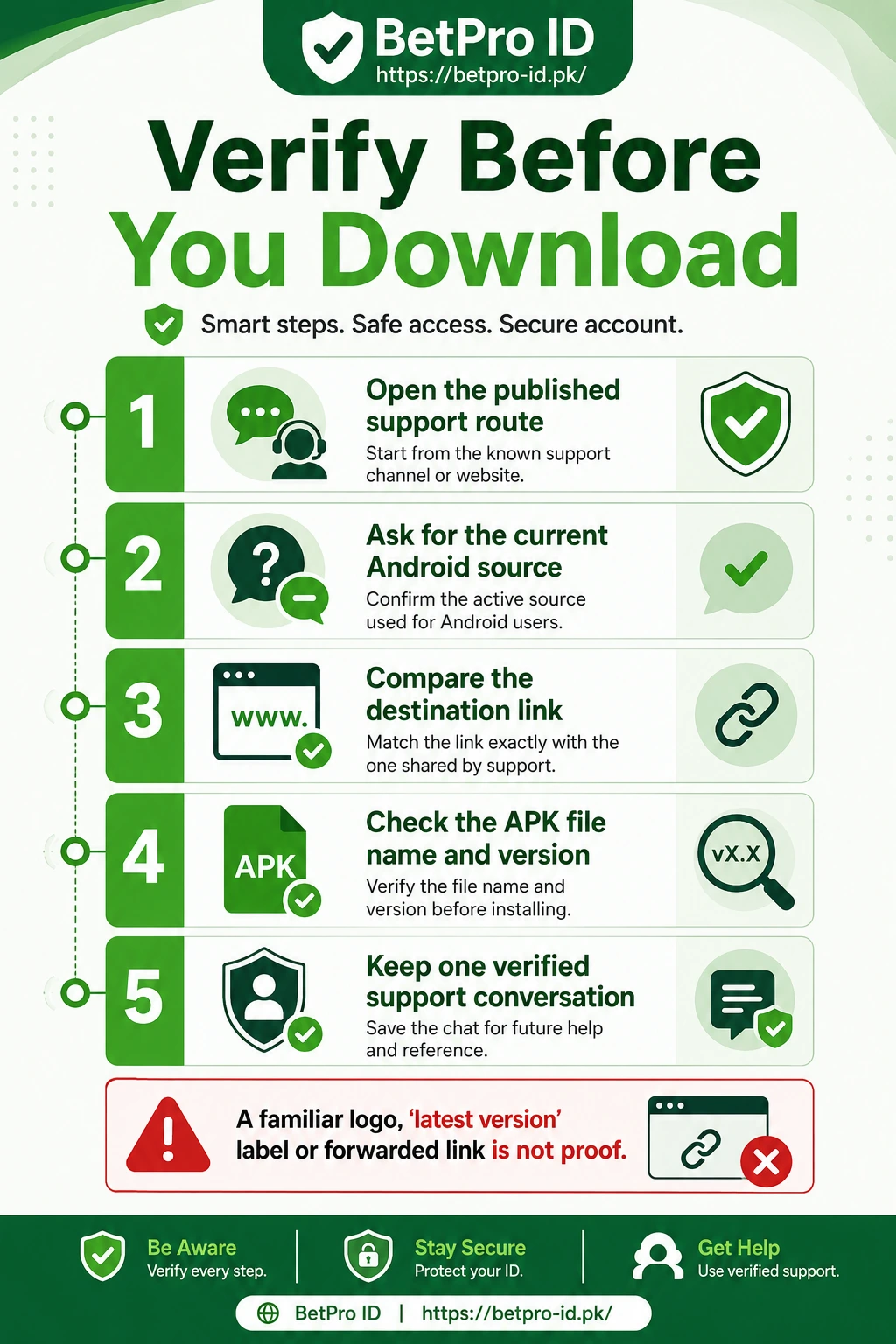
Before downloading anything, use the support route published on BetPro-ID.PK and ask for the current Android source. The verified route currently published by the site points users to support rather than to random public APK mirrors.
This step matters because a search result can look convincing without being current. A page title can say “official,” “latest,” “2026,” “secure,” or “original,” but those words are only labels. They do not independently prove that a file is the supported version.
When support provides a current source, compare three things before continuing: the destination link, the expected file name, and any version information that support gives you. If a forwarded message sends you somewhere else, stop and return to the verified conversation.
Do not change to a new contact simply because the profile uses a BetPro logo or familiar name. Keep one verified conversation when possible. This reduces the chance of mixing instructions from different people, outdated screenshots, or copied links.
The purpose of verification is not to make a dramatic claim that every third-party source is malicious. It is to establish a reliable chain: published support route, current download source, matching file, then installation.
2. Check your Android device before downloading
A failed installation is not always a bad APK. Sometimes the phone is the problem. Before starting a BetPro app download for Android, check basic device conditions so you do not repeatedly download the same file.
Make sure there is enough free storage for the download and installation process. Android may need additional temporary space beyond the final app size. If storage is nearly full, remove unnecessary files or apps first rather than deleting security tools.
Check that your date and time are set correctly and that the phone has a stable connection. Interrupted downloads can leave incomplete files that will not install. If you use mobile data, wait for the download to finish before switching networks or closing the browser.
Also review whether an older copy of the app is already installed. Multiple old and new copies can create confusion about which icon you are opening. If support confirms that an update is required, note your BetPro ID privately before making changes and make sure you know the current password.
Do not assume a specific Android version, RAM requirement, or APK file size unless the current verified source provides that information. Those technical details can change. A guide that hard-codes an old file size or version may become misleading even if the rest of the instructions remain useful.
3. Inspect the APK file before installation
Once the download finishes, do not tap through every prompt immediately. Check what Android actually downloaded.
First, confirm that the file completed successfully. A partial or interrupted download may appear in the Downloads folder but fail when opened. Compare the file name with the current information supplied through verified support.
Second, look for obvious mismatches. If you expected one APK but the browser downloaded a compressed archive, executable for another operating system, document, or strangely named package, stop. Do not rename an unfamiliar file to make it look like an APK.
Third, pay attention to version language. Searches such as “BetPro app download latest version,” “BetPro app download 2026,” and “BetPro exchange app download latest version” show that freshness matters to users. However, a year in the file name is not verification. Confirm the current version through support instead of choosing whichever search result has the newest-looking label.
Finally, keep the original download source available until you have installed and tested the app. If something behaves unexpectedly, you will know exactly where the file came from and can describe the issue accurately.
4. Keep Android protection active during installation
Some APK installations require Android to allow installation from the browser or file manager that opened the file. That permission should be handled narrowly.
Do not disable every Android security feature. Do not follow instructions that tell you to turn off device protection permanently. Android security controls exist because sideloaded apps can carry additional risk.
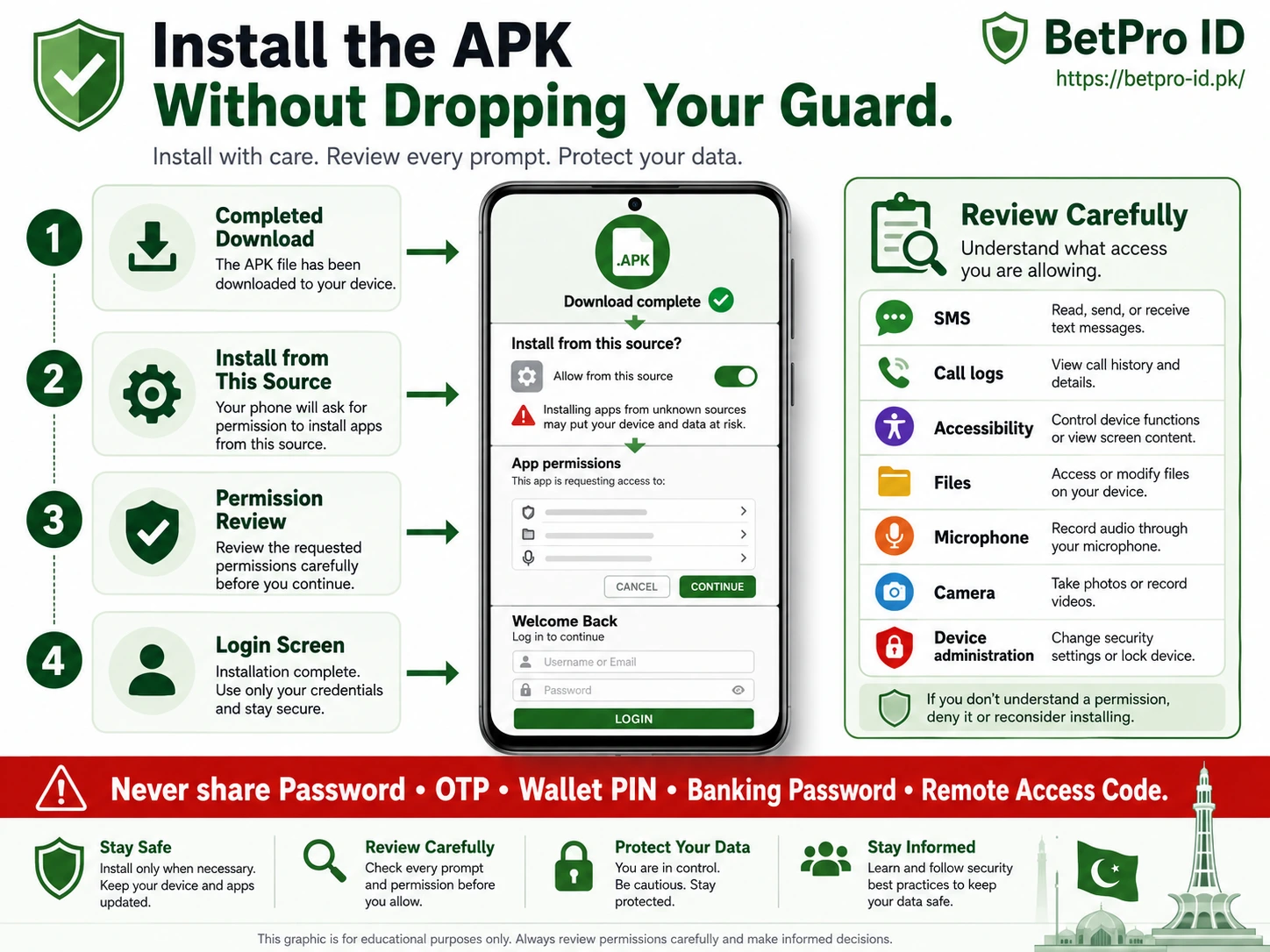
If your phone asks whether the specific browser or file manager may install unknown apps, read the prompt carefully. Allow only what is necessary for the current installation. After installation, you can review that permission again and remove it when it is no longer required.
Google Play Protect may also scan apps installed from outside Google Play. If Android displays a security warning, do not treat the warning as an obstacle that must automatically be bypassed. Stop, read it, and verify the source again.
This is one area where convenience and safety can conflict. A video or download page may tell users to switch off warnings because doing so makes the tutorial shorter. That does not make the advice better. The safer approach is to preserve normal device protection and solve the specific installation issue instead.
5. Review app permissions instead of allowing everything
After installation, the app may request access to device features. Permissions should match a visible need.
Android lets users allow or deny permissions and change them later in Settings. Review each request rather than pressing “Allow” automatically. Be especially cautious with access to SMS messages, call logs, accessibility controls, full file access, contacts, microphone, camera, device administration, or the ability to install other apps.
A permission is not automatically malicious just because it sounds powerful. Some legitimate features require camera access or storage access. The question is whether the request makes sense for the feature you are using and whether you have verified the app source.
Stop if an unfamiliar app asks for remote control, accessibility access without a clear reason, banking credentials, wallet PINs, or an OTP. Those are not normal details to give to a person who is helping with an app installation.
You can review permissions again after setup. If a permission was needed only for one visible task, remove it when that task is finished. This keeps the device configuration closer to the minimum access required.
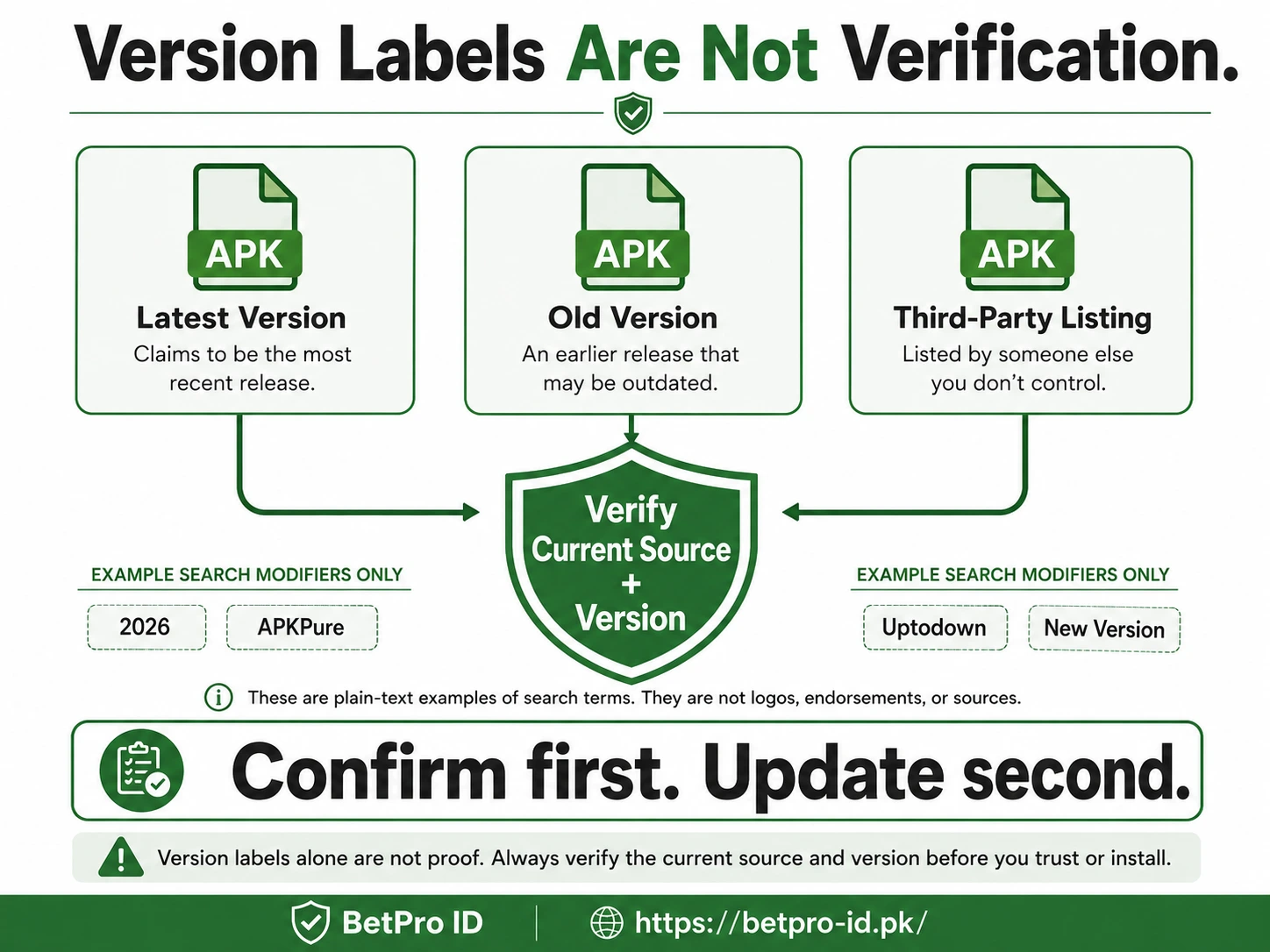
6. Treat “latest version,” APKPure, and Uptodown as search modifiers, not proof
Your keyword data shows strong interest in phrases such as betpro app download latest version, APKPure, Uptodown, old version, new version, and 2026. These modifiers reveal what users worry about: freshness, compatibility, and finding a file that installs.
They do not create separate trust signals.
A listing on APKPure, Uptodown, or another third-party directory may be useful for discovering that an app name exists, but the listing itself should not be treated as confirmation that the file is the current supported BetPro app for your ID. Compare any package information with the source confirmed through the published support route.
The same rule applies to “latest version.” A page can keep the phrase in its title long after the actual file changes. The safest freshness check is current verification, not the wording of a search snippet.
Old versions deserve even more caution. An older APK may stop connecting correctly, may not work with a newer Android release, or may contain an outdated route. Use an old version only if verified support specifically confirms that it is appropriate for your device.
Avoid modified, cracked, unlocked, premium, or hacked versions. Those labels indicate that the package has been altered or is being promoted outside the normal support path. They offer no advantage that is worth exposing login credentials or device data.
7. Install the APK, then verify the first screen before login
When the source, file, and Android settings are checked, open the downloaded APK and follow the normal Android installation prompt.
After installation, do not enter credentials the instant the icon appears. Open the app and look at the first screen. Confirm that the application appears consistent with the source you verified and that it is asking for the expected BetPro ID login rather than unrelated information.
A supported app login should use the existing BetPro ID and private password. Your WhatsApp number is not automatically your BetPro ID. Installing the application also does not create a new ID.
Enter the BetPro ID carefully, check for extra spaces, confirm the keyboard language, and type the private password yourself. Do not send the password to a support contact to “test” it.
If the app opens an unfamiliar account or displays details that are not yours, log out and stop. If the same credentials work through supported browser access but fail in the app, that points toward an app, version, or device issue rather than an automatic need for a new ID.
For full app-login troubleshooting, use the BetPro App pillar and the dedicated BetPro ID Login Help page.
8. Know what to do when the BetPro app download or installation fails
Troubleshoot one stage at a time.
If the download will not start, check the network, browser storage permission, free space, and whether the source is still current. Do not jump from site to site downloading multiple APK copies.
If the file downloads but will not install, confirm that the download completed, check Android storage, review the specific unknown-app installation permission, and look for an existing conflicting copy.
If the app installs but closes immediately, restart the phone, check free storage, close unnecessary apps, and confirm that you have the current supported version. Avoid repeatedly clearing all phone data or resetting the device for a single app issue.
If you see a blank or white screen, test another network, make sure automatic date and time are correct, reopen the app, and compare the result with supported browser access.
If the app rejects the ID or password, test the credentials through the correct web-login route. A forgotten password is a separate support issue. Follow the BetPro ID password guide instead of reinstalling multiple APK files.
If the app displays an update prompt, do not install an update from an unfamiliar popup without verification. Return to the same published support route and confirm the current source.
9. Use the browser when the app is not the practical option
A mobile app is convenient, but it is not always the best access method for every device.
If Android storage is low, installation keeps failing, the current app source is temporarily unavailable, or you simply prefer not to sideload an APK, supported browser access can be the cleaner option. The same BetPro ID and private password normally work across supported app and web access.
Browser testing is also useful for diagnosis. If browser login works while the app fails, you have narrowed the issue to the application, its version, permissions, network behavior, or device compatibility. If both app and browser reject the same credentials, check the ID and password rather than downloading another file.
For iPhone users, remember that an Android APK cannot run on iOS. Searches such as “betpro app download ios apk” combine two incompatible formats. Use supported browser access unless a verified iPhone option is available.
For Windows or macOS, avoid random “BetPro app for PC” executables and browser extensions. Use the supported web route rather than installing a file built for an unknown desktop source.
Trade-offs
BetPro app download versus browser access
The app can offer convenient repeat access on an Android phone, but installation introduces extra decisions: source verification, APK handling, permissions, updates, and compatibility. Browser access avoids APK installation and can be useful on iPhone, computers, low-storage phones, or devices where the app is unstable.
Neither option changes the basic security rule. Keep the BetPro ID and password private, verify the route you are using, and do not give someone remote control of the device.
A practical strategy is to keep browser access as a fallback even when the app works. That gives you a way to test whether a problem belongs to the account or only to the application.
Latest version versus old version
“Latest” sounds automatically better, but only a verified current version matters. A newly labelled file from an unknown source is not safer than an older file from a confirmed route.
At the same time, staying on an outdated APK indefinitely can cause compatibility or connection problems. The balanced approach is to confirm the current supported version before updating and keep only the versions you genuinely need.
Do not collect multiple APK files from different websites. More copies make it harder to know which package is installed and which source produced a later problem.
Convenience versus device security
Sideloading can be convenient when an app is distributed outside a normal store, but it also asks the user to make security decisions that app stores usually handle more centrally.
Keep those decisions narrow. Allow installation only where required, read permissions, keep Android protection active, and stop when warnings or requests do not make sense.
The goal is not to create fear around every APK. It is to avoid sacrificing normal phone security for the sake of completing a download quickly.
Next Steps
If you are ready to download, start with the main BetPro App guide and use the verified support route published there to confirm the current Android source. Then follow the checks in this article before installing.
If you do not yet have a BetPro ID, go to the Create ID guide instead of assuming the app will register you automatically.
If you already have an ID but login fails, use BetPro ID Login Help. If the password is forgotten, use the password recovery guide. If a contact, APK, or permission request looks suspicious, use the security guide and verified support.
Is BetPro app download free?
BetPro-ID.PK does not charge users for ID creation or for accessing its guidance. For the current app file and any conditions attached to the supported source, confirm the details through the verified support route before downloading. Do not pay an unfamiliar contact simply to receive a download link or unlock a password.
Where can I get the BetPro app download APK latest version?
Do not choose a file only because a page says “latest version,” “2026,” APKPure, or Uptodown. Confirm the current Android source and version through the support route published on BetPro-ID.PK, then compare the file information before installing.
Can I use BetPro app download on iPhone or PC?
An Android APK cannot be installed on an iPhone, and it should not be treated as a Windows or macOS installer. Use supported browser access on iOS and computers unless a verified platform-specific option is available.
Conclusion
A safe BetPro app download is less about finding the fastest APK and more about knowing which source you are trusting. Confirm the current Android route, inspect the file, preserve Android protection, review permissions, and use your existing BetPro ID and private password only after the app checks out.
For the complete app experience—including Android installation, login, browser fallback, permissions, version checks, iPhone and PC guidance, and troubleshooting—continue to the BetPro App Download, Login and Android APK Guide.
If anything looks unfamiliar, stop before entering credentials. Return to verified support, explain what you are seeing, and share only the minimum information needed to identify the issue. Never share a password, OTP, wallet PIN, banking password, email password, or remote-access code.
EDITORIAL REVIEW
Reviewed for clarity, safety and independent status
This article is managed by the BetPro-ID.PK Support and Editorial Desk. Content is checked before publication and updated when important facts change.