
TL;DR
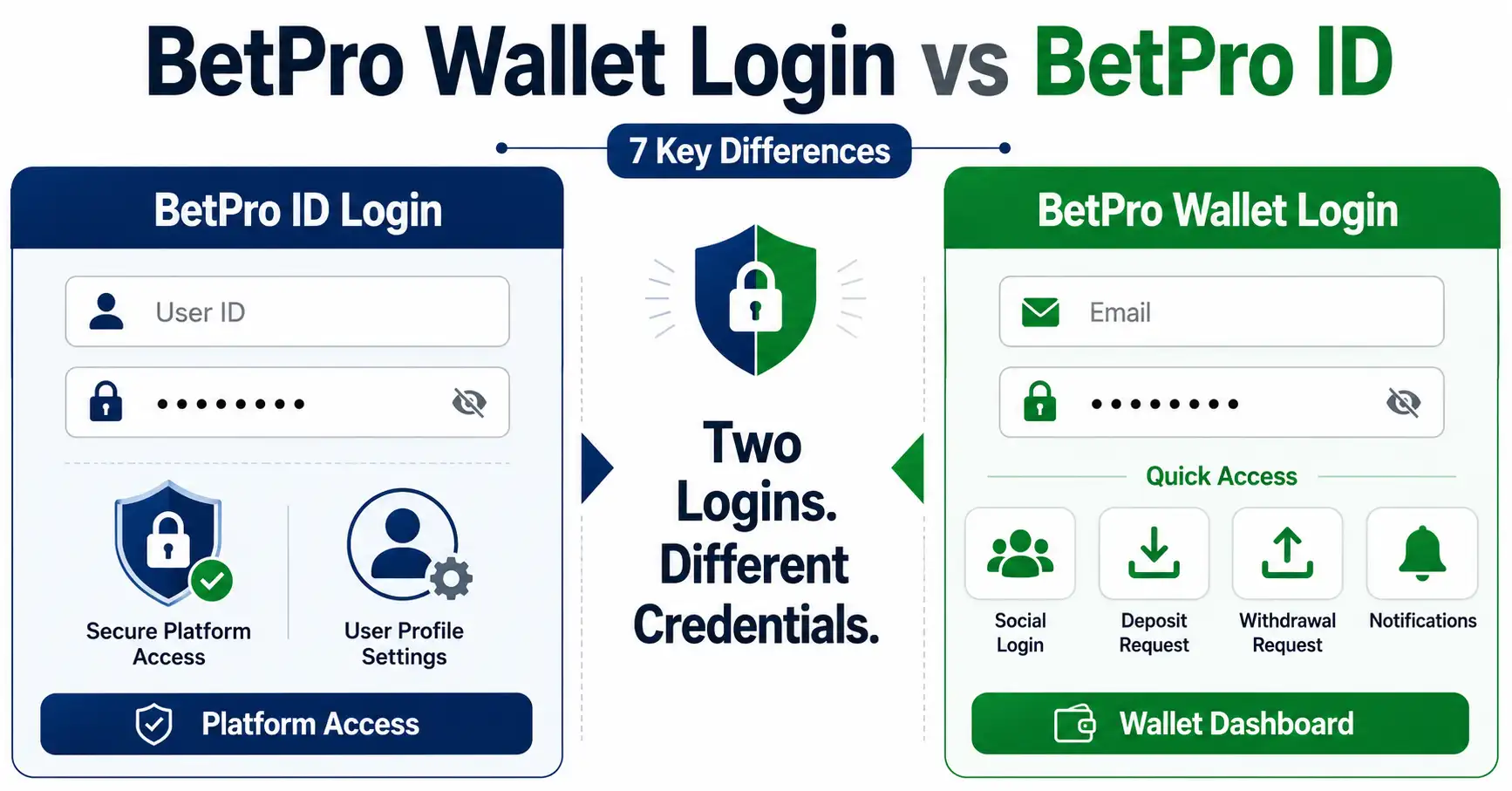
BetPro wallet login and BetPro ID login are different systems. Use the Wallet dashboard for deposits, withdrawals, tracking, notifications, or Wallet support. Use BetPro ID login for platform access.
The Wallet usually uses a registered email and Wallet password. It may also support Google login. BetPro ID login uses an assigned BetPro ID and password.
If you forget the BetPro ID password, contact your existing assigned dealer first. If you forget the Wallet password, use the Wallet Forgot Password option.
Android users may use the latest approved Wallet APK. iPhone users should use browser access. Do not install random APK files or use shared passwords.
This guide explains seven key differences and shows which login fits each task.
For normal platform problems, open the BetPro ID login guide. For password help, read the BetPro ID password guide.
Context
BetPro Wallet Login vs BetPro ID Login: 7 Key Differences
BetPro wallet login opens the BPExch Wallet dashboard. BetPro ID login opens normal platform access. Both systems may support the same user journey, but they do not use the same credentials or perform the same job.
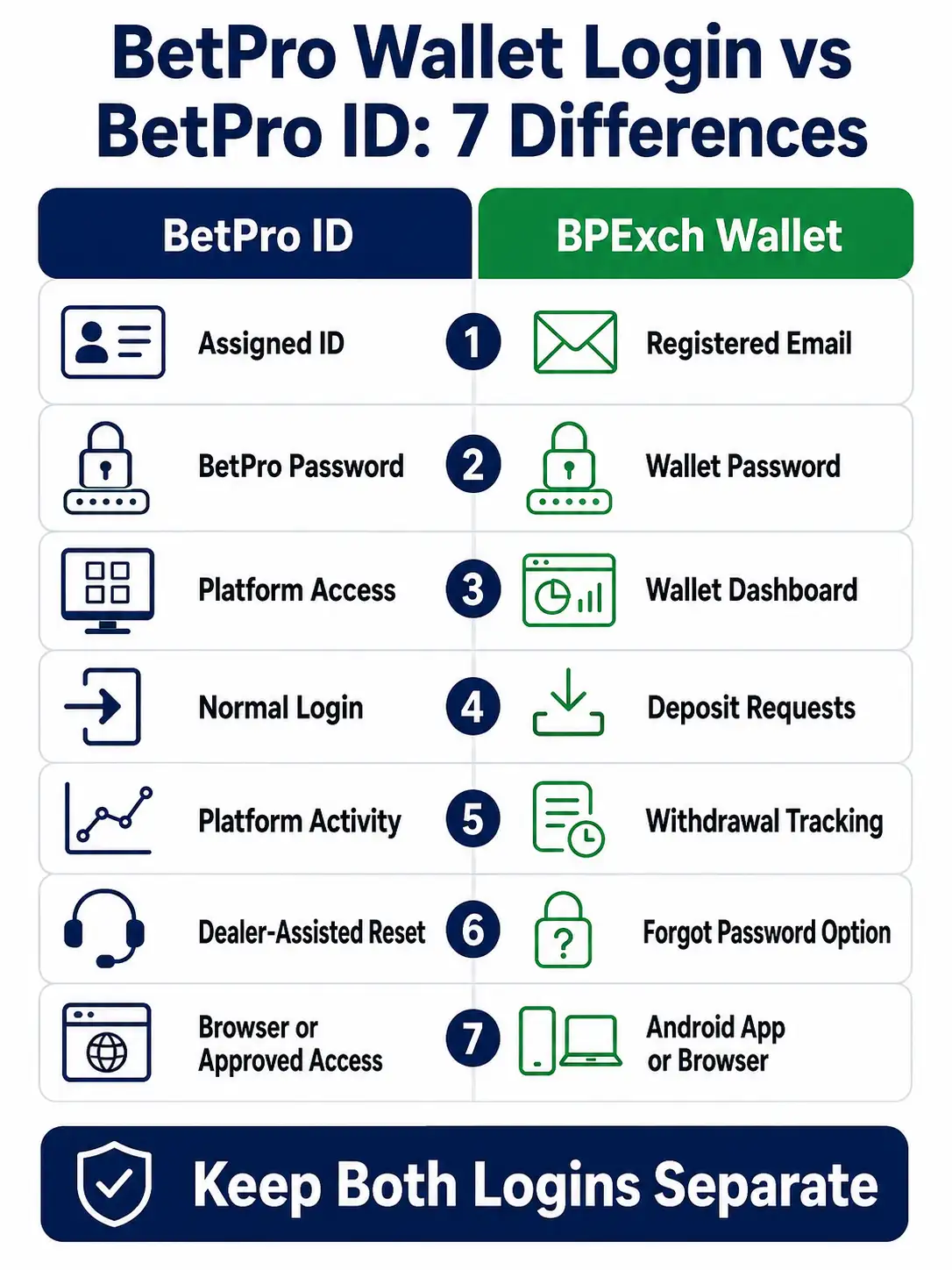
Here are the seven main differences:
- BetPro wallet login uses a registered email, while BetPro ID login uses an assigned ID.
- The Wallet password and BetPro ID password are separate.
- BetPro wallet login opens the Wallet dashboard, while BetPro ID login opens the platform.
- Deposit requests are managed through the Wallet dashboard.
- Withdrawal requests and status tracking are managed through the Wallet dashboard.
- Wallet password recovery uses the Wallet Forgot Password option, while BetPro ID recovery starts with the assigned dealer.
- BPExch Wallet supports Android APK access and browser access, while BetPro ID access may use supported browser or app routes.
A BetPro ID is the user’s main platform identity. The Wallet profile is a separate dashboard identity. One does not replace the other.
Users often confuse the systems because both may appear during setup, payments, password help, or support. One person can therefore have two sets of login details.
Think of the Wallet as a service desk and request tracker. Think of the BetPro ID as the key used to enter the platform.
The safest approach is simple. Keep both logins separate. Save each one under a clear name. Use the correct password in the correct place.
Why Users Mix Up the Two Logins
Both systems can be used on the same phone. Both may show a login form. Both may mention support. Both may help users reach the next step.
This creates several common mistakes:
- Entering a Wallet email in the BetPro ID field
- Entering a BetPro ID in the Wallet email field
- Using the Wallet password on the BetPro login page
- Using the BetPro password on the Wallet login page
- Saving both logins under one name
- Requesting a second ID instead of fixing the correct login
The systems check different records.
Use a clear label for each one:
- BetPro ID Platform Login
- BPExch Wallet Dashboard Login
Do not save both as “BetPro.” That name is too broad and can cause autofill mistakes.
What Works
1. BetPro Wallet Login Uses Email, Not the BetPro ID
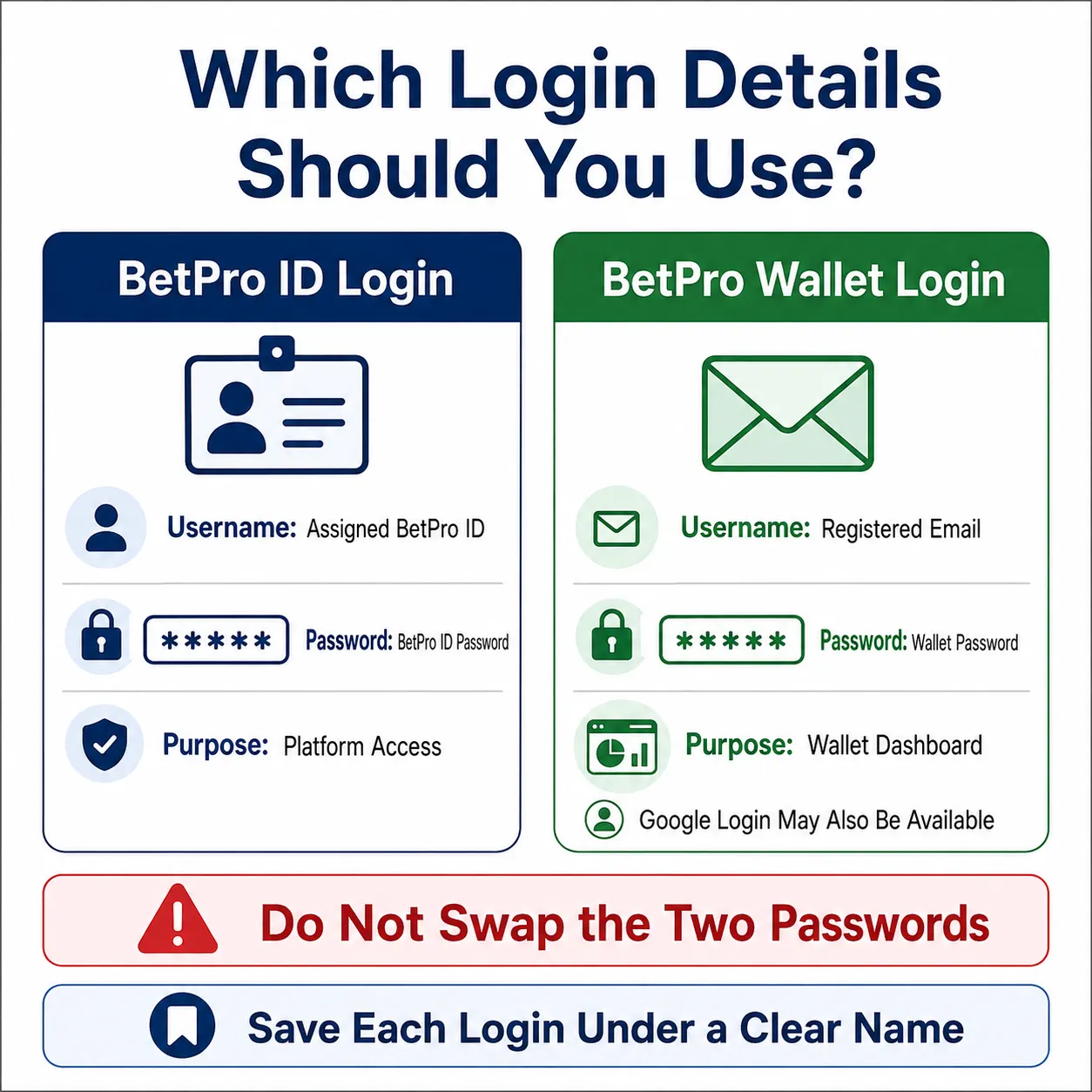
BetPro wallet login normally uses the email registered with the Wallet profile. The user also enters the Wallet password.
Where available, the Wallet may also offer Google login. This means a user can enter through the Google profile linked to the Wallet registration.
BetPro ID login is different. It uses the assigned BetPro ID and the password linked to that ID.
Use this simple rule:
Wallet dashboard: email and Wallet password.
Platform access: BetPro ID and BetPro password.
When a login fails, first check which system you are opening. Do not assume the password is wrong before checking the login name.
A Wallet login form may ask for an email. A BetPro login form may ask for an ID. These labels tell you which credentials belong there.
If a browser fills the wrong details, remove the saved entry and type the correct information by hand.
2. The Two Passwords Protect Different Systems
The BetPro ID password protects platform access. The Wallet password protects the BPExch Wallet dashboard.
They are not one shared password.
Using the same password for both systems is unsafe. One exposed login may endanger the other.
Create two separate passwords. Keep each one long and hard to guess.
Avoid passwords based on:
- Your name
- Your phone number
- Your BetPro ID
- Your email address
- Your city
- Your birth year
- Simple patterns such as 123456
- The word password
A password manager can help. Create one entry for the Wallet and another for the BetPro ID.
Do not store passwords in a public note, open message, or screenshot. Do not send either password to an unknown person.
Read the BetPro ID security guide for more ways to protect your login details.
3. BetPro ID Login Opens Platform Access
Use BetPro ID login when you want to enter the main platform.
An existing user normally needs:
- The assigned BetPro ID
- The current BetPro ID password
- A trusted browser or approved app
- A stable internet connection
- A device the user controls
Enter the ID and password carefully. Check capital letters, numbers, and spaces.
The same BetPro ID and password may work across supported access points. A page change does not normally require a new ID.
Do not request another ID because:
- One page is slow
- An app does not open
- A browser saved an old password
- The password was forgotten
- The ID is inactive or locked
Each problem has a separate solution.
Use BetPro ID Login Help for inactive, locked, disabled, or repeated login errors.
Read how BetPro ID works for the full journey from setup to login, payments, support, and withdrawal conditions.
4. BetPro Wallet Login Opens the Wallet Dashboard
Use BetPro wallet login when you want to open the BPExch Wallet dashboard.
The dashboard can help users manage actions such as:
- Deposit requests
- Payment proof uploads
- Withdrawal requests
- Payout details
- Request status tracking
- Notifications
- Wallet support
- BetPro ID support requests
The Wallet dashboard is a separate request and support system.
Status labels help users follow each request.
Keep the request reference and hide private details before sharing proof.
Do not create a new Wallet profile because one request is pending. Use the existing dashboard and check the current status.
The Wallet may also help with BetPro ID support. This connection does not merge the two logins.
5. Deposit Requests Belong to the Wallet Dashboard
Use BetPro wallet login when you need to submit or track a Wallet deposit request.
A normal deposit request may involve these steps:
- Log in to the Wallet.
- Open the deposit section.
- Select the payment method.
- Enter the amount.
- Upload clear payment proof.
- Submit the request.
- Track the status.
- Wait for an approval or support update.
The verified minimum deposit is Rs. 500.
Keep the original receipt or transfer proof. Save the transaction reference. Do not submit the same deposit request several times while the first one is still active.
Duplicate requests can confuse tracking.
BetPro ID login does not replace the Wallet deposit request form. The BetPro platform and Wallet dashboard perform different jobs.
For wider payment information, read the BetPro deposit and withdrawal guide.
6. Withdrawal Requests and Tracking Belong to the Wallet
Use BetPro wallet login when you want to submit or track a Wallet withdrawal request.
The process may include:
- Opening the withdrawal section
- Entering the requested amount
- Adding payout details
- Reviewing the information
- Submitting the request
- Tracking the request status
- Reading notifications
- Responding to support questions
The verified minimum withdrawal is Rs. 500.
Withdrawal eligibility may also depend on platform conditions. At least 50% of the first deposited amount must be rolled through events before withdrawal. This condition affects withdrawal eligibility.
The Wallet tracks the request but does not remove applicable conditions.
Do not create another Wallet profile because a withdrawal is pending. Keep the same profile, request reference, and support conversation.
7. Password Recovery Works Differently
Password recovery is one of the most important differences.
Forgotten BetPro ID Password
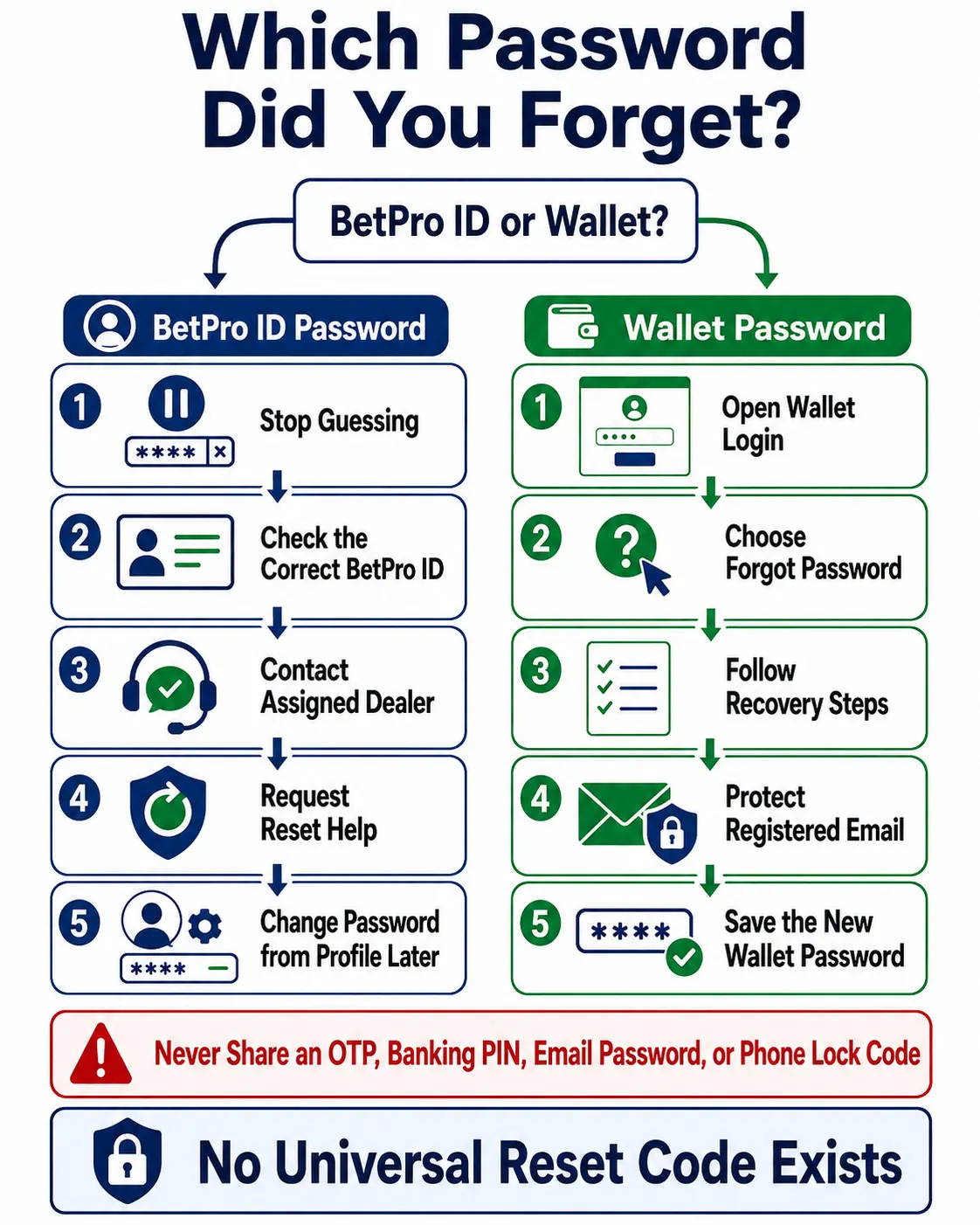
When the user forgets the BetPro ID password, the confirmed process starts with the existing assigned dealer.
The user should:
- Stop guessing.
- Check the correct BetPro ID.
- Contact the assigned dealer first.
- Explain that the password is forgotten.
- Share only safe identification details.
- Wait for the dealer to help with the reset.
- Log in carefully.
- Change the password from Profile when needed.
Users do not have a confirmed self-service forgotten-password reset option for BetPro ID.
Read the BetPro ID password guide for the complete process.
Forgotten BPExch Wallet Password
When the user forgets the Wallet password, use the Wallet Forgot Password option.
Follow the recovery steps linked to the registered Wallet details. Make sure the registered email remains secure and accessible.
Do not use the BetPro ID password as the Wallet reset answer. Do not ask a stranger for a free Wallet password.
If the Wallet recovery option fails, follow the approved Wallet support process.
The simple rule is:
BetPro ID forgotten password: assigned dealer first.
Wallet forgotten password: Wallet Forgot Password.
Which Login Should You Use for Support?
Choose support based on the problem.
Use BetPro ID support when the issue involves:
- Platform login
- Inactive or locked ID
- BetPro ID password
- App access
- General ID status
- BetPro ID creation
Use the Wallet dashboard when the issue involves:
- Wallet login
- Deposit request status
- Withdrawal request status
- Payment proof
- Wallet notifications
- Wallet password recovery
- Wallet-based BetPro ID support
The Wallet may help with BetPro ID support, but that does not make every platform issue a Wallet issue.
When unsure, identify where the problem appears: platform issues go to BetPro ID support; dashboard issues go to Wallet support.
Use the verified support page when the normal assigned route is unavailable.
How the Wallet Can Help with a BetPro ID
The Wallet can support part of the BetPro ID journey.
A user may create a Wallet profile, follow the Wallet process, submit a first deposit request, and receive BetPro ID support after approval.
This creates a connected path:
- Register for the Wallet.
- Log in to the Wallet.
- Submit the required request.
- Track the request status.
- Receive a support update.
- Receive BetPro ID support or assignment.
- Use the BetPro ID for platform access.
- Keep the Wallet login for later request tracking.
Even in this connected journey, the credentials remain separate.
The Wallet email and password open the dashboard. The BetPro ID and password open the platform.
Do not delete the Wallet credentials after receiving a BetPro ID. You may still need the Wallet for payment requests, withdrawal requests, notifications, or support.
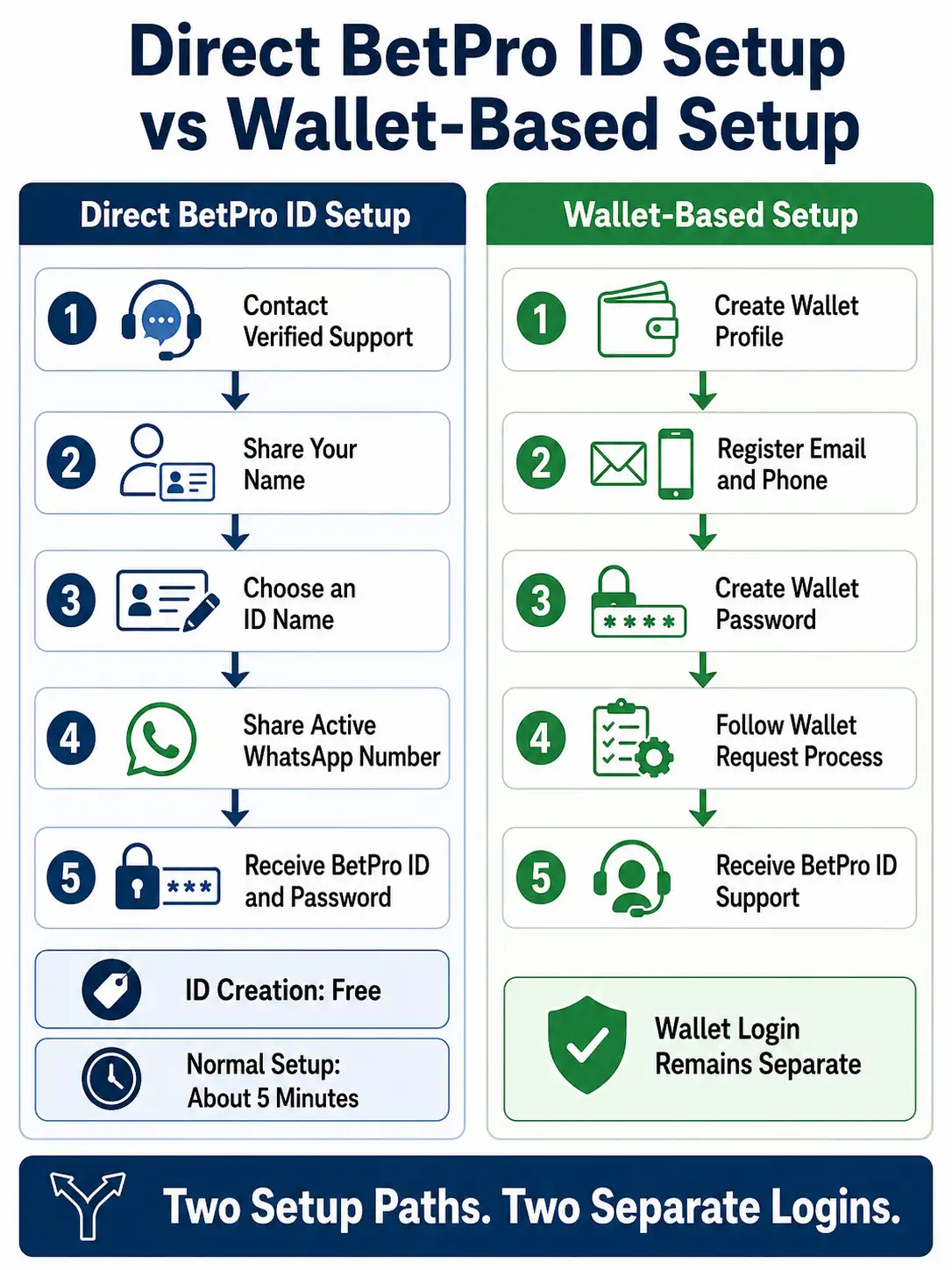
Direct BetPro ID Setup vs Wallet-Based Setup
There are two possible setup paths.
Direct BetPro ID Setup
The direct route uses verified support.
The user normally provides:
- Name
- Desired BetPro ID name
- Active WhatsApp number
BetPro ID creation is free.
Setup normally takes about five minutes after the correct details are provided.
The user receives the BetPro ID and password. Deposit is a separate later step.
Use the Create BetPro ID guide for the full direct process.
Wallet-Based Setup
The Wallet route starts with a Wallet profile.
The user may provide:
- Name
- Phone number
- Wallet password
The user then follows the Wallet standard process. This may include a deposit request and approval. BetPro ID support or assignment may follow.
The Wallet dashboard automates request tracking and updates.
Neither route makes the Wallet password and BetPro ID password the same.
BetPro Wallet Login on Android
Android users may use the latest approved BPExch Wallet APK.
The app may support:
- Wallet signup
- BetPro wallet login
- Google access where available
- Deposit requests
- Withdrawal requests
- Notifications
- Request tracking
- BetPro ID support
Use only the latest approved version. Do not rely on an old fixed version number.
Do not install:
- Modified APK files
- Shared files from unknown groups
- APK files that promise free passwords
- Files with copied logos
- Apps that request unusual permissions
- Downloads from random comments
A fake APK can collect login details.
The app does not change the credential rule. The Wallet app uses Wallet credentials. The BetPro platform uses BetPro ID credentials.
BPExch Wallet Access on iPhone
An Android APK does not work on an iPhone.
iPhone users should use browser access for the Wallet.
Do not search for an “iPhone APK.” That phrase is misleading because APK files belong to Android.
A fake iPhone download may install an unsafe profile or copy a login page.
Use a supported browser. Keep the phone updated. Avoid saving Wallet or BetPro ID passwords on a shared device.
The Wallet email and password remain separate from the BetPro ID and password.
Common BetPro Wallet Login Problems
A Wallet login can fail for several reasons.
Wrong Email
Check the email registered with the Wallet. A spelling mistake will stop the login.
Wrong Wallet Password
Make sure the browser did not fill the BetPro ID password.
Wrong Google Profile
The user may select a Google profile that is not connected with the Wallet.
Old Saved Password
The browser may keep an old Wallet password after a change.
Shared Device Confusion
A family phone may hold several saved emails and passwords.
Weak Internet
A slow connection may stop the login page from loading fully.
Old App
An outdated APK may fail or behave differently.
Unsafe Copy
A copied app or page may not connect with the real Wallet record.
Check one issue at a time. Do not create another profile.
Common BetPro ID Login Problems
BetPro ID login can also fail for several reasons.
Wrong BetPro ID
Check letters, numbers, and spaces.
Wrong BetPro Password
Make sure the Wallet password was not entered by mistake.
Inactive or Locked ID
This is a status problem. Contact the assigned dealer.
Old Saved Password
Remove the old saved entry after a password change.
Slow Access Point
Keep the same ID and password. Use the trusted access route.
App Issue
Try the trusted browser and check the approved app source.
Do not request a duplicate ID because one login attempt fails.
How to Store Both Logins Safely
Use separate password-manager entries.
Name them clearly:
- BetPro ID Platform Login
- BPExch Wallet Dashboard Login
Save the correct user name or email in each entry.
Create a different password for each system.
Do not store full passwords in:
- Public WhatsApp messages
- Shared notes
- Screenshots
- Photo galleries
- Unlocked files
- Group chats
Use a screen lock, install updates, and remove untrusted apps.
Protect the email linked to the Wallet. If someone controls that email, the person may try to recover the Wallet password.
Log out after using a shared phone.
How to Choose the Correct Login on a Shared Phone
Shared phones often save several IDs, emails, and passwords.
Before selecting an autofill entry, check the user name.
For the platform, choose the saved BetPro ID.
For the Wallet, choose the registered email.
Do not let a public computer save either password.
After use:
- Log out.
- Close the browser.
- Remove saved credentials when needed.
- Clear private downloads.
- Check that no screenshot remains.
A shared phone may also open the wrong Google profile. Check the selected email before using Google login for the Wallet.
Never show the other user your password.
What to Do After Changing One Password
Update only the matching saved entry.
If you changed the BetPro ID password, update the platform entry.
If you changed the Wallet password, update the Wallet entry.
Delete the old saved version. Test the new password once.
Change both passwords together only for a clear security reason.
Log out from shared devices.
Watch for messages that claim another urgent reset is required. A scammer may contact the user after a real support request.
Why “BetPro Wallet Login Password Free” Is Unsafe
There is no safe reason to use a free Wallet password.
A shared password may belong to another person. A public list may contain stolen or fake credentials.
A password APK may copy the Wallet login screen. It may collect the email, password, messages, files, or device data.
Avoid pages or files that promise:
- Free Wallet passwords
- Unlimited Wallet access
- Working shared emails
- Password cracking
- Modified APKs
- Admin access
- Instant deposit approval
- Guaranteed withdrawals
Use only the Wallet profile registered for you.
If you already installed a suspicious file, remove it. Change important passwords from a clean device. Check your email and Wallet for unusual activity.
BetPro ID Login Aur BPExch Wallet Login Mein Kya Farq Hai?
BetPro ID login platform access ke liye hota hai. Is mein assigned BetPro ID aur us ka password use hota hai.
BetPro wallet login dashboard ke liye hota hai. Is mein registered email aur Wallet password use hota hai. Google login option bhi available ho sakta hai.
Wallet dashboard se deposit request, withdrawal request, status tracking, notifications, aur support manage ki ja sakti hai.
Dono passwords alag hain. Wallet password ko BetPro ID login mein use na karein. BetPro password ko Wallet email login mein use na karein.
BetPro ID password bhool jayein to assigned dealer se pehle contact karein. Wallet password bhool jayein to Wallet ka Forgot Password option use karein.
Android users latest approved Wallet APK use kar sakte hain. iPhone users browser access use karein. Free password, shared login, ya modified APK se bachain.
Trade-offs
Why This Guide Does Not Link Directly to Wallet Login
This comparison is not an external login doorway.
Direct login links may change. Copied links may also mislead users.
The article focuses on the decision:
- Platform access means BetPro ID login.
- Wallet dashboard means BetPro wallet login.
Users should follow the approved access route already provided through their support process.
This keeps the guide useful when paths or versions change.
Why a Wallet Profile Does Not Replace a BetPro ID
A Wallet profile and BetPro ID serve different purposes.
The Wallet profile opens the dashboard. The BetPro ID opens the platform.
The Wallet may help a user receive BetPro ID support. That connection does not merge the credentials.
Many users may need both systems:
- Wallet login for requests and updates
- BetPro ID login for platform access
Deleting or forgetting one set of details may block an important part of the user journey.
Keep both records safe and clearly labeled.
Why Password Recovery Must Stay Separate
BetPro ID recovery starts with the assigned dealer when the password is forgotten.
Wallet recovery uses the Wallet Forgot Password option.
These methods are different because the logins use different user records.
Do not search for one universal reset code. Do not share an OTP, email password, or phone code with an unknown person.
Use the recovery route that belongs to the login you are trying to open.
What This Guide Does Not Cover
This guide does not provide:
- A direct Wallet login link
- A direct APK file
- A complete Wallet signup tutorial
- A full deposit process
- A full withdrawal process
- Alternative BetPro domains
- Admin credentials
- Free passwords
- Shared login details
- Guaranteed approval times
It explains which login to use, which credentials belong there, and how to avoid common mistakes.
Next Steps
Choose the Correct Login
Use this final path.
Want normal platform access?
Use BetPro ID login.
Want the Wallet dashboard?
Use BetPro wallet login.
Forgot the BetPro ID password?
Contact your assigned dealer first.
Forgot the Wallet password?
Use the Wallet Forgot Password option.
Need to submit or track a deposit?
Use the Wallet dashboard.
Need to submit or track a withdrawal?
Use the Wallet dashboard.
Need help with an inactive or locked ID?
Open BetPro ID Login Help.
Need a new BetPro ID?
Use the Create ID guide.
See a free password or modified APK?
Do not download it.
Is BetPro Wallet Login the Same as BetPro ID Login?
No. BetPro ID uses an assigned ID and password for platform access. BetPro wallet login uses a registered email and Wallet password, or Google login, for the dashboard.
Can I Use My BetPro ID Password for BPExch Wallet?
Not normally. The systems use separate credentials. Save them under different labels and use a different password for each login.
Which Login Should I Use for Deposit and Withdrawal Tracking?
Use BetPro wallet login for Wallet deposit requests, withdrawal requests, status tracking, and notifications.
Conclusion
Need platform access? Open BetPro ID Login Help. Forgot your platform password? Read the BetPro ID Password Guide and contact your assigned dealer first.
EDITORIAL REVIEW
Reviewed for clarity, safety and independent status
This article is managed by the BetPro-ID.PK Support and Editorial Desk. Content is checked before publication and updated when important facts change.